The 5 Best Audio Interfaces for BandLab
BandLab can record a voice with a laptop microphone, but an external interface becomes useful when you need a real XLR mic, an electric guitar or two people at once. The app does not add sockets to the hardware. Count the physical inputs before shopping, and check whether you are using BandLab in a desktop browser or on a phone.
I'd start with the Scarlett Solo for one person on a computer. The M-Track Duo is the inexpensive two-mic route; the MOTU M4 is for a desk that has grown into more sources and MIDI. Mobile BandLab users should confirm their device's USB and power support before buying any of these desktop boxes.
Our top 5 audio interfaces for bandlab
Swipe to compare price, rating and best use →
| Product | Price | Rating | Best for |
|---|---|---|---|
01 Focusrite Scarlett Solo 4th GenDetails ↓ Focusrite Scarlett Solo 4th GenDetails ↓ | $159.99 | 4.6/5Amazon | Best for one voice and guitar |
02 M-Audio M-Track DuoDetails ↓ M-Audio M-Track DuoDetails ↓ | $69.00 | 4.4/5Amazon | Best budget two-person input |
03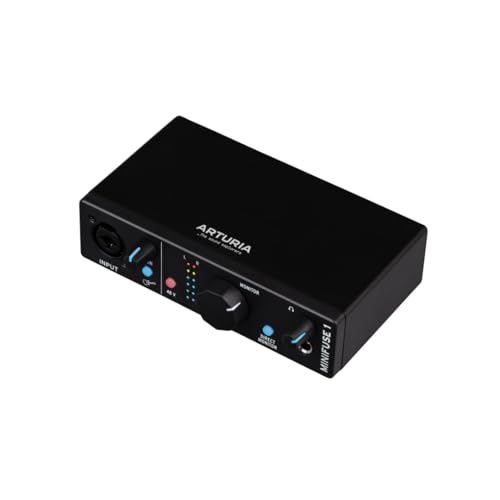 Arturia MiniFuse 1Details ↓ Arturia MiniFuse 1Details ↓ | $119.00 | 4.7/5Amazon | Best for a minimal desktop chain |
04 PreSonus AudioBox USB 96Details ↓ PreSonus AudioBox USB 96Details ↓ | $94.99 | 4.3/5Amazon | Best for older USB-A desks |
05 MOTU M4Details ↓ MOTU M4Details ↓ | $279.95 | 4.6/5Amazon | Best for a growing recording desk |
01 — Focusrite
Best for one voice and guitarFocusrite Scarlett Solo 4th Gen
I would start a one-person BandLab desk with the Scarlett Solo. Its separate microphone and instrument connections, direct monitoring and documented setup keep the hardware decision simple while you learn the recording software.
It leads for that common solo job, not for podcasts with two hosts. There is only one physical mic preamp; loopback is a software channel, not a second XLR socket. If another person regularly joins, buy the M-Track Duo or a larger interface from the start.
Specifications: Focusrite Scarlett Solo connections ↗
View on Amazon ↗One singer or speaker adding a guitar.
Two people need XLR microphones simultaneously.
What I like
+Defined mic and instrument paths with direct monitoring.
What to weigh
−Only one physical mic preamp.
- Inputs
- 1 mic, 1 line/instrument
- Conversion
- 24-bit / 192 kHz
- Monitoring
- Direct monitor and loopback
- Connection
- USB-C (USB 2.0 protocol)
02 — M-AUDIO
Best budget two-person inputM-Audio M-Track Duo
The M-Track Duo earns second place because its two physical combo inputs solve a different BandLab problem: recording two mics or instruments at once. M-Audio also documents phantom power and a direct-monitor switch.
I would take it over the Solo only when the second socket will be used. Its basic controls and monitor setup are a compromise beside the more developed Focusrite workflow; check how your computer or mobile device exposes both channels in BandLab.
Specifications: M-Audio M-Track Duo specifications ↗
View on Amazon ↗Two analog sources on a small recording budget.
You work alone and prefer the Scarlett setup.
What I like
+Two real combo input sockets.
What to weigh
−Basic routing and platform setup need checking.
- Inputs
- 2 mic/line/instrument combo
- Conversion
- Up to 48 kHz
- Monitoring
- Direct mono or stereo
- Connection
- USB-B; bus powered
03 — Arturia
Best for a minimal desktop chainArturia MiniFuse 1
MiniFuse 1 is the tidy single-input choice when your BandLab projects start with one mic or instrument and you want a compact interface on the desk. Arturia pairs its input with direct monitoring and a USB hub port for a small peripheral.
It ranks behind the Solo and M-Track because one combo input cannot record a separate mic and guitar at the same time. The hub port does not change the recording channel count. I would choose it for a deliberately minimal setup, not a growing two-person show.
Specifications: Exact Amazon product listing ↗
View on Amazon ↗One source at a time with a small desk footprint.
You need simultaneous mic and guitar or two XLRs.
What I like
+Compact single-input design with useful monitoring.
What to weigh
−One analog input limits later sessions.
- Inputs
- 1 mic/line/instrument combo
- Conversion
- 24-bit / 192 kHz
- Monitoring
- Direct monitor
- Connection
- USB-C; USB-A hub
04 — PreSonus
Best for older USB-A desksPreSonus AudioBox USB 96
The AudioBox USB 96 is worth considering if you need two mic/instrument combo inputs and a conventional USB-A computer setup. It also gives you MIDI ports for older controllers or keyboards that do not connect over USB.
I place it fourth because its older USB design and controls are less convenient for a modern phone-first workflow. It is still a valid two-input desktop option; compare its actual cable and driver support with your operating system before choosing it over the M-Track Duo.
Specifications: Exact Amazon product listing ↗
View on Amazon ↗Two inputs plus five-pin MIDI on a computer desk.
You mainly record on a USB-C phone.
What I like
+Two combo inputs and MIDI connections.
What to weigh
−Older connection approach and mobile power uncertainty.
- Inputs
- 2 mic/instrument combo
- Conversion
- 24-bit / 96 kHz
- MIDI
- 5-pin input and output
- Connection
- USB-B; bus powered
05 — MOTU
Best for a growing recording deskMOTU M4
I would buy the MOTU M4 only when the BandLab desk has more than one or two sources: the extra rear line inputs, four outputs, MIDI ports and front meters are useful when other hardware enters the chain.
It sits fifth because that capability costs more and four inputs do not mean four microphone preamps. A solo creator would carry complexity they do not need. If you already have line-level synths or plan outboard routing, the M4 can be the right pick despite its position.
Specifications: MOTU M Series user guide ↗
View on Amazon ↗Several line-level sources and MIDI equipment at a desktop.
You need the cheapest way to record one or two mics.
What I like
+Four-in/four-out routing and visible meters.
What to weigh
−Only two mic preamps and higher cost.
- ProductType
- audio interface
Price information
Amazon price and availability checked Oct 18, 2026, 3:46 AM Lisbon time. Prices and availability are subject to change; the information shown on Amazon.com at purchase applies.
Our process
How we picked.
We compare five relevant products for different needs, using documented specifications, clear use cases and practical trade-offs. Our goal is to make the differences clear and help you choose with confidence.
- 01Relevance
Each product must fit the guide’s intended use, audience and requirements.
- 02Specifications
We compare the key product details that meaningfully affect the buying decision.
- 03Use case and fit
We compare the intended use, configuration and practical fit of every selected product.
- 04Strengths and limitations
We explain where each option performs best and the compromises to consider.
Good questions
FAQ — Audio Interfaces for BandLab
01Do I need an interface to use BandLab?+
No. You can start with a built-in microphone or supported USB mic. An interface is useful for XLR microphones, instrument inputs, monitoring and recording more than one analog source.
02Does BandLab support two microphones if my interface has them?+
The hardware needs two physical mic inputs and the particular BandLab app or browser must expose the inputs you want. Test the routing on your device before planning a two-person recording.
03Is an interface with MIDI ports necessary?+
Only if you use five-pin MIDI equipment. A USB MIDI keyboard can normally connect directly to the computer; the MOTU M4 adds MIDI for gear that needs those sockets.
The short answer
Start with the Focusrite Scarlett Solo 4th Gen.
I recommend it for one singer or speaker adding a guitar. Choose something else if two people need xlr microphones simultaneously.
View on Amazon ↗Keep looking
Related guides
The 5 Best Wired Earbuds for Curious Audiophiles
Five Meze, KZ, FiiO and CCA wired IEMs for USB-C phones, detachable cables or a lower-cost fit trial.

The 5 Best Audio Interfaces for XLR Microphones
Five audio interfaces for xlr mic, chosen for useful everyday performance, practical features and clear value for the intended use.

The 5 Best Audio Interfaces for Mac by Recording Setup
Five Audient, Focusrite, Universal Audio, MOTU and M-Audio interfaces for one voice, two mics and MIDI recording.

The 5 Best Audio Interfaces for Recording
Five Audio Interfaces for Recording, including Focusrite and Piyone, compared for input count, monitoring and computer compatibility.
The 5 Best Audio Interfaces for Streaming by Host Count
Five Focusrite, Zoom, Audient and Behringer interfaces for solo streams, hardware loopback and multi-mic rooms.