The 5 Best Digital Photo Frames for Sharing Pictures
The best digital frame is the one relatives can keep updated after the gift has been unwrapped. Screen size matters, but so does the upload path: who installs the app, who controls the Wi-Fi, and whether the recipient can operate it without troubleshooting every visit. If the frame will sit across a room, a larger screen can matter more than another menu feature.
I start with the 10.1-inch Frameo option because remote sharing is the point of this category for many families. The 15.6-inch model is the display-led choice; Dragon Touch is a lower-cost way to start. Before gifting any of them, I would set it up on the recipient's network and send a few pictures myself to check that the workflow makes sense.
Our top 5 digital photo frames for sharing pictures
Swipe to compare price, customer rating and best use →
| Product | Price | Customer rating | Best for |
|---|---|---|---|
01 MaxAngel Frameo 10.1-Inch Wi-Fi FrameDetails ↓ MaxAngel Frameo 10.1-Inch Wi-Fi FrameDetails ↓ | $69.99 | 4.6/5 | Best straightforward remote sharing |
02 BIGASUO Frameo 15.6-Inch Full HD FrameDetails ↓ BIGASUO Frameo 15.6-Inch Full HD FrameDetails ↓ | $129.99 | 4.5/5 | Best across-the-room display |
03 Dragon Touch 10.1-Inch FrameDetails ↓ Dragon Touch 10.1-Inch FrameDetails ↓ | $53.99 | 4.5/5 | Best lower-cost connected gift |
04 AEEZO 10.1-Inch Wi-Fi FrameDetails ↓ AEEZO 10.1-Inch Wi-Fi FrameDetails ↓ | $49.99 | 4.5/5 | Best inexpensive Frameo option |
05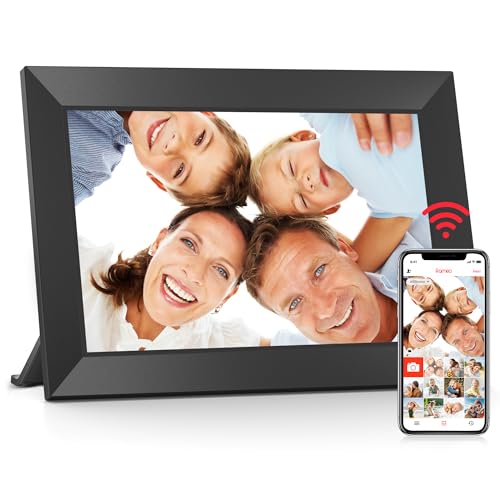 BIGASUO 10.1-Inch FrameDetails ↓ BIGASUO 10.1-Inch FrameDetails ↓ | $69.99 | 4.5/5 | Best alternate 10-inch gift frame |
01 — MaxAngel
Best straightforward remote sharingFrameo 10.1-Inch Wi-Fi Frame
This 10.1-inch Frameo frame is for a family that wants several people to add pictures remotely after the gift is delivered. The appeal is the familiar app-led sharing workflow, not the largest panel in the group. Check the exact model's storage and invitation settings, and make sure the recipient's Wi-Fi reaches its intended shelf. A frame that cannot stay connected becomes a more awkward USB slideshow.
First because a manageable 10-inch frame and remote contributions suit the broadest gift use. The 15.6-inch Frameo goes higher on physical impact, but needs more space and costs more.
Specifications: Exact Amazon product listing ↗
View on Amazon ↗Families sending photos remotely to one home.
The recipient lacks reliable Wi-Fi.
What I like
+App-led photo sharing in a desk-size frame.
What to weigh
−Setup and network dependence.
- Display
- 10.1 inch
- Storage
- 32 GB
- Connection
- Wi-Fi
02 — BIGASUO
Best across-the-room displayFrameo 15.6-Inch Full HD Frame
The 15.6-inch Frameo model makes sense when photos will be viewed from a sofa or placed on a larger shelf. A Full HD panel gives more room for portraits and family scenes, but the physical footprint and power cable must fit the location. I would check viewing angle and whether the larger frame dominates the room before treating screen size as an automatic upgrade.
Second earns a clear display-size role. The smaller 10.1-inch Frameo is a better default gift for an unknown shelf, while this one suits a planned location.
Specifications: Exact Amazon product listing ↗
View on Amazon ↗A larger room and planned display space.
You have only a small bedside shelf.
What I like
+Large Full HD display.
What to weigh
−Needs more space and higher spend.
- Display
- 15.6 inch, 1920 × 1080
- Storage
- 64 GB
- Connection
- Wi-Fi
03 — Dragon Touch
Best lower-cost connected giftDragon Touch 10.1-Inch Frame
Dragon Touch is a budget-conscious connected frame for someone willing to help with the initial Wi-Fi and app setup. Its 10.1-inch size fits a desk or sideboard without demanding the space of a tablet-size display. Compare the exact upload method, storage and family invitation controls with Frameo before gifting; the cheapest frame is not a bargain if relatives stop sending pictures.
Third keeps a connected sharing option at a lower current price. Frameo leads where the known app workflow is the priority; this one is the price-led alternative.
Specifications: Exact Amazon product listing ↗
View on Amazon ↗A connected photo gift on a smaller budget.
You need the largest viewing area.
What I like
+Low-priced Wi-Fi frame.
What to weigh
−Sharing workflow needs confirmation.
- Display
- 10.1 inch
- Control
- Touchscreen
- Connection
- Wi-Fi
04 — AEEZO
Best inexpensive Frameo optionAEEZO 10.1-Inch Wi-Fi Frame
AEEZO is for a shopper who wants a 10.1-inch Frameo-based frame while keeping the purchase modest. The app name is a useful starting point, but verify the exact model's screen resolution, storage and support rather than assuming every Frameo frame is identical. At gift time, the recipient's internet access and ease of accepting photo contributors still decide whether it gets used.
Fourth offers another Frameo-format price point. The first pick ranks higher for its clearer general gift brief; AEEZO is worth a look when the offer is meaningfully cheaper.
Specifications: Exact Amazon product listing ↗
View on Amazon ↗Budget shoppers preferring a Frameo workflow.
You want a larger premium display.
What I like
+Lower-priced app-led sharing.
What to weigh
−Model-specific support needs checking.
- Display
- 10.1 inch
- Storage
- 32 GB
- Connection
- Wi-Fi
05 — BIGASUO
Best alternate 10-inch gift frameBIGASUO 10.1-Inch Frame
BIGASUO is a fallback for a 10-inch Wi-Fi photo gift when the other connected frames do not suit the buyer's preferred design or offer. I would compare stand angle, screen resolution and setup instructions with the first Frameo pick; similarly sized frames can behave differently on a bright shelf. It still needs a person to manage its initial connection and invitations.
Fifth because its use case overlaps the stronger 10-inch options rather than opening a new display category. It remains a relevant alternative if its exact setup and price suit the recipient better.
Specifications: Exact Amazon product listing ↗
View on Amazon ↗A 10-inch Wi-Fi frame with different styling.
You need a distinct larger screen.
What I like
+Another compact connected choice.
What to weigh
−Overlap with the leading 10-inch frames.
- Display
- 10.1 inch
- Storage
- 32 GB
- Connection
- Wi-Fi
Price information
Amazon price and availability checked Oct 24, 2026, 4:06 AM Lisbon time. Prices and availability are subject to change; the information shown on Amazon.com at purchase applies.
Our process
How we picked.
We compare five relevant products for different needs, using documented specifications, clear use cases and practical trade-offs. Our goal is to make the differences clear and help you choose with confidence.
- 01Relevance
Each product must fit the guide’s intended use, audience and requirements.
- 02Specifications
We compare the key product details that meaningfully affect the buying decision.
- 03Use case and fit
We compare the intended use, configuration and practical fit of every selected product.
- 04Strengths and limitations
We explain where each option performs best and the compromises to consider.
Good questions
FAQ — Digital Photo Frames for Sharing Pictures
01Does a Wi-Fi frame work without internet?+
Some frames can keep showing stored photos, but remote uploads require a working connection. Check the exact model instructions.
02Should I set up a gifted frame first?+
Yes, if possible. Connect it to the recipient’s Wi-Fi, update the software and send test photos using the intended sharing method.
The short answer
Start with the Frameo 10.1-Inch Wi-Fi Frame.
I recommend it for families sending photos remotely to one home. Choose something else if the recipient lacks reliable wi-fi.
View on Amazon ↗Keep looking
Related guides
The 5 Best Digital Photo Frames for Grandparents
Five digital photo frames for grandparents compared by remote sharing, screen legibility, setup and storage.
The 5 Best Wi-Fi Digital Photo Frames
Five Wi-Fi photo frames, including Frameo 10.1-inch and KUNTRONIC 32GB models, compared by display size, sharing and storage.

The 5 Best Wi-Fi Security Cameras for a House
Five Wyze, Tapo, GALAYOU and Cinnado cameras for doorways, two indoor rooms, solar outdoor spots and budget checks.