The 5 Best Laptop Docking Stations for Different Desks
One cable can tidy a desk, but it cannot make a laptop support displays it was never designed to drive. Before buying a dock, write down the laptop model, operating system, monitor inputs, target resolution and refresh rate, and the power the laptop needs. 'Dual monitor' on an Amazon title does not answer whether your machine supports two independent screens through that connection.
The Anker is my first dual-monitor comparison for a stationary desk once host compatibility is confirmed. Plugable's triple-display dock makes sense when a third screen is truly needed, though its DisplayLink software and charging version deserve extra checking. The tiny UANTIN hub belongs in a travel bag.
Our top 5 laptop docking stations for different desks
Swipe to compare price, rating and best use →
| Product | Price | Rating | Best for |
|---|---|---|---|
01 Anker Dual-Monitor DockDetails ↓ Anker Dual-Monitor DockDetails ↓ | $53.99 | 4.5/5Amazon | Best dual-monitor desk starting point |
02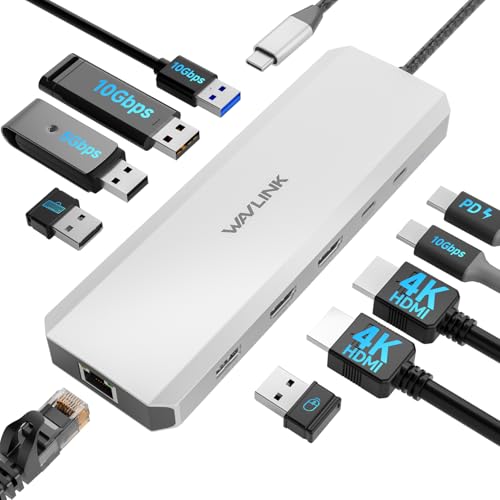 WAVLINK Laptop Docking StationDetails ↓ WAVLINK Laptop Docking StationDetails ↓ | $39.99 | 4.3/5Amazon | Best lower-cost fixed-desk alternative |
03 UANTIN USB-C HubDetails ↓ UANTIN USB-C HubDetails ↓ | $9.99 | 4.4/5Amazon | Best slim travel hub |
04 Plugable USB-C Triple-Monitor DockDetails ↓ Plugable USB-C Triple-Monitor DockDetails ↓ | $194.99 | 4.4/5Amazon | Best for a verified triple-display need |
05 HODO USB-C Dual-Monitor Dock for HPDetails ↓ HODO USB-C Dual-Monitor Dock for HPDetails ↓ | $37.99 | 4.3/5Amazon | Best HP-led dual-display candidate |
01 — Anker
Best dual-monitor desk starting pointAnker Dual-Monitor Dock
Anker's dual-monitor dock is the first one I would compare for a fixed laptop workstation. The exact laptop still has to provide the right video and charging capabilities; two monitor sockets on a dock do not create a second display signal in an unsupported host. I would match the Anker model's documented display modes, included power supply and cable with both monitors before buying.
It leads because it offers a clear dual-screen desk use from a named vendor at a modest current price. Plugable is worth much more only if a third display and its software route are required.
Specifications: Exact Amazon product listing ↗
View on Amazon ↗A compatible laptop with two fixed displays.
You need a pocket-sized travel hub.
What I like
+Named dual-monitor workstation dock.
What to weigh
−Host video and charging still need matching.
02 — WAVLINK
Best lower-cost fixed-desk alternativeWAVLINK Laptop Docking Station
WAVLINK is the alternate dock I would inspect if its exact port arrangement suits the desk better than Anker's. Verify the model's display technology, charging output and supported operating system against the laptop before ordering; none can be inferred from the brand alone. Its value is turning a proven host-and-monitor combination into a repeatable one-cable desk routine.
Second gives a different fixed-desk configuration at a lower current offer. Anker stays first for a clearer dual-display comparison, while UANTIN is easier to carry.
Specifications: Exact Amazon product listing ↗
View on Amazon ↗A fixed desk matching WAVLINK's ports.
You need the smallest travel adapter.
What I like
+Desk-dock format at a modest price.
What to weigh
−Exact host support requires checking.
03 — UANTIN
Best slim travel hubUANTIN USB-C Hub
UANTIN is the inexpensive hub I would pack for hotel HDMI, a USB accessory or a presentation setup when a full desk dock would be overkill. Its small body is the benefit, but it is not a reason to assume it will charge a powerful laptop or run multiple independent monitors. Check the exact port version and any power pass-through requirement for the laptop before relying on it away from home.
Third because portable connection is a genuinely different job. Anker and WAVLINK are better matched to a repeatable desk, while this is a compact tool for occasional ports.
Specifications: Exact Amazon product listing ↗
View on Amazon ↗Travelers needing a few extra ports.
You need a verified multi-monitor workstation.
What I like
+Low-cost compact hub.
What to weigh
−Limited power and display expectations.
04 — Plugable
Best for a verified triple-display needPlugable USB-C Triple-Monitor Dock
Plugable's triple-monitor dock is for a buyer who has already confirmed that a third independent screen will improve their work. Its DisplayLink path can support a setup that a simple video hub cannot, but it may require software, and Plugable notes that charging capability changed between versions of the same model. I would verify the exact unit, host operating system and monitor outputs before spending this much.
Fourth because triple-screen capability is valuable but specialized and expensive. Anker is the better default for two screens; this earns its place only for a documented third-display requirement.
Specifications: Exact Amazon product listing ↗
View on Amazon ↗A compatible three-screen workstation.
You need a plug-and-play travel hub.
What I like
+Triple-display-oriented dock.
What to weigh
−Software and charging-version checks.
05 — HODO
Best HP-led dual-display candidateUSB-C Dual-Monitor Dock for HP
This HP-positioned dual-monitor dock belongs on the shortlist only if the buyer's exact HP laptop supports the display path it uses. I would compare the dock's compatibility chart with the laptop model and both monitors, including refresh rate and charging wattage. A broad 'for HP' title does not mean every HP USB-C port can drive two independent external screens.
Fifth is a host-specific candidate, not a universal winner. Anker has the stronger general-desk case; this earns a place for a confirmed matching HP setup.
Specifications: Exact Amazon product listing ↗
View on Amazon ↗Owners of a compatible HP laptop and two displays.
Your host has limited USB-C video support.
What I like
+Dual-display-oriented desk layout.
What to weigh
−Compatibility claim is model dependent.
Price information
Amazon price and availability checked Oct 17, 2026, 10:25 PM Lisbon time. Prices and availability are subject to change; the information shown on Amazon.com at purchase applies.
Our process
How we picked.
We compare five relevant products for different needs, using documented specifications, clear use cases and practical trade-offs. Our goal is to make the differences clear and help you choose with confidence.
- 01Relevance
Each product must fit the guide’s intended use, audience and requirements.
- 02Specifications
We compare the key product details that meaningfully affect the buying decision.
- 03Use case and fit
We compare the intended use, configuration and practical fit of every selected product.
- 04Strengths and limitations
We explain where each option performs best and the compromises to consider.
Good questions
FAQ — Laptop Docking Stations for Different Desks
01Will any USB-C dock drive two external monitors?+
No. Host USB-C capabilities, operating system, dock technology and display bandwidth determine whether two independent screens work.
02Does a dock charge every laptop?+
No. Compare the dock’s power-delivery output and cable with the laptop’s required charging input, including any power the dock itself uses.
The short answer
Start with the Anker Dual-Monitor Dock.
I recommend it for a compatible laptop with two fixed displays. Choose something else if you need a pocket-sized travel hub.
View on Amazon ↗Keep looking
Related guides5 Best Laptop Docking Stations
Five laptop docking stations, including Anker Laptop Docking Station Dual and Acer USB-C Docking Station Dual, compared for host port, display outputs and power delivery.

The 5 Best Docking Stations with USB C
Five Docking Station With Usb C compared by host compatibility, video outputs and power delivery, with distinct products for different uses.
The 5 Best USB C for Laptops Docking Stations
Five Usb C Docking Station For Laptops compared by host compatibility, video outputs and power delivery, with distinct products for different uses.
The 5 Best Dual-Monitor Docking Stations for Different Laptops
Five WAVLINK, HP-oriented, generic and UANTIN docks for fixed desks, compatible laptops and travel HDMI.