The 5 Best Gaming Headsets with Mics for Different Setups
If your friends keep asking you to repeat yourself, a headset's surround-sound badge is beside the point. Decide first whether you need a cable, a wireless receiver or a mic you can remove for travel. Then make a short recording on your own device: the connector, chat settings and boom position can matter more than a driver-size claim.
For nightly calls I would start with Cloud III Wired, whose documented USB and 3.5 mm routes make setup clearer. Barracuda X earns its place for a player moving between devices. Kraken is the roomier analog option, Ozeino the lowest-cost wired entry, and NUBWO the cable-free budget detour. The latter two deserve a quick mic recording on your actual platform as soon as they arrive.
Our top 5 gaming headsets with mics for different setups
Swipe to compare price, rating and best use →
| Product | Price | Rating | Best for |
|---|---|---|---|
01 HyperX Cloud III WiredDetails ↓ HyperX Cloud III WiredDetails ↓ | $69.99 | 4.3/5Amazon | Best reliable wired chat |
02 Razer Barracuda XDetails ↓ Razer Barracuda XDetails ↓ | $69.00 | 4.2/5Amazon | Best multi-device wireless mic |
03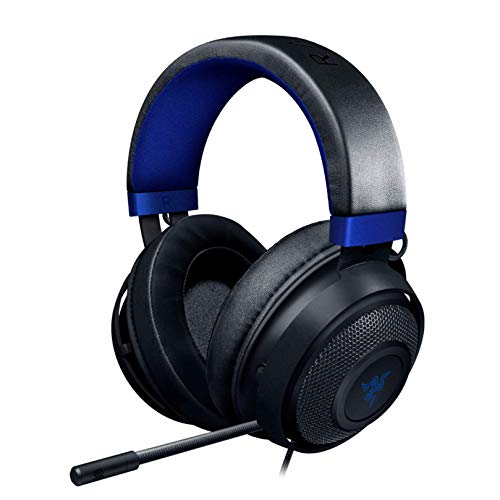 Razer KrakenDetails ↓ Razer KrakenDetails ↓ | $99.01 | 4.5/5Amazon | Best substantial analog cup |
04 NUBWO G06Details ↓ NUBWO G06Details ↓ | $29.99 | 4.3/5Amazon | Best budget wireless chat |
05 Ozeino OW810Details ↓ Ozeino OW810Details ↓ | $29.98 | 4.3/5Amazon | Best occasional starter mic |
01 — HyperX
Best reliable wired chatHyperX Cloud III Wired
Cloud III Wired is my first comparison for someone who spends whole evenings in team voice chat. HyperX documents a detachable noise-canceling microphone and both 3.5 mm and USB connections, which makes the desk setup more flexible. The cable is deliberate: choose a wireless set if moving freely around the room matters more than a stable wired connection.
First for repeated voice sessions because HyperX documents a detachable mic plus USB and 3.5 mm connection choices. I would take a cable over battery management when the player stays at a desk; Barracuda X wins only when moving between devices matters more.
Specifications: HyperX Cloud III product details ↗
View on Amazon ↗Regular PC or console chat.
You need freedom from a cable.
What I like
+Documented mic and connection options.
What to weigh
−Wired use keeps you at the device.
02 — Razer
Best multi-device wireless micRazer Barracuda X
Barracuda X is the one to examine if the headset travels between a PC and another gaming device. Wireless use clears the desk of a dangling cable, but it introduces a charging routine and compatibility questions: verify the exact edition’s dongle, ports and supported consoles before purchase. I would not pay for that flexibility if the headset never leaves a single desktop.
Second for the player who alternates between a gaming desk and another compatible device. Razer documents a removable cardioid mic and wireless dongle route, but confirm the exact generation in the offer; connection modes and battery claims vary across Barracuda X versions.
Specifications: Razer Barracuda X support ↗
View on Amazon ↗Gaming across devices.
You want a simple no-charge cable.
What I like
+Detachable mic and mobile use.
What to weigh
−Version and receiver checks.
03 — Razer
Best substantial analog cupRazer Kraken
Razer Kraken is for someone who prefers a larger over-ear feel and a familiar analog connection. I would compare its weight and clamp with Cloud III before paying more, especially if you wear glasses. The extra bulk may feel reassuring on a desk yet become tiresome when you keep a headset on through several matches.
Third if a roomy, familiar over-ear shape suits your head and your platform accepts its analog connection. I would compare weight and clamp during the return window. A bigger headset does not automatically give teammates a clearer voice than Cloud III.
Specifications: Exact Amazon product listing ↗
View on Amazon ↗Players preferring a larger earcup.
Headset weight bothers you.
What I like
+Straightforward analog route.
What to weigh
−Bulk and fit may tire long sessions.
04 — NUBWO
Best budget wireless chatNUBWO G06
NUBWO G06 is the wireless detour in this list. It can clear a cable from the keyboard area, but I would confirm the included dongle, platform support and how the microphone behaves on the actual connection you will use. For competitive voice chat, I would buy a known wired fit first unless cable freedom solves a real annoyance.
Fourth for a player who needs a wireless desk at a lower price. That convenience brings a receiver, charging and compatibility checks. I would make a test call on the intended console or PC immediately; a wireless label says little about the mic mode your game will use.
Specifications: Exact Amazon product listing ↗
View on Amazon ↗Low-cost cable-free play.
You want the least setup friction.
What I like
+Freedom from a desk cable.
What to weigh
−Mic path and battery routine.
05 — Ozeino
Best occasional starter micOzeino OW810
Ozeino OW810 is a starter headset for occasional squad play on a tight budget. I would check the mic plug and make a short voice recording on the intended PC or controller as soon as it arrives. At this price, comfort, replaceability and a clear return window matter more to me than an ambitious gaming-audio label.
Fifth for occasional team calls when the budget is strict. Verify the exact plug and adapter before buying, then record your voice on the real device. I would not rely on a low price for nightly ranked chat if the earcups or mic prove uncomfortable.
Specifications: Exact Amazon product listing ↗
View on Amazon ↗Infrequent squad calls.
You play long competitive nights.
What I like
+Low purchase price.
What to weigh
−Fit and voice need immediate testing.
Price information
Amazon price and availability checked Oct 18, 2026, 12:01 AM Lisbon time. Prices and availability are subject to change; the information shown on Amazon.com at purchase applies.
Our process
How we picked.
We compare five relevant products for different needs, using documented specifications, clear use cases and practical trade-offs. Our goal is to make the differences clear and help you choose with confidence.
- 01Relevance
Each product must fit the guide’s intended use, audience and requirements.
- 02Specifications
We compare the key product details that meaningfully affect the buying decision.
- 03Use case and fit
We compare the intended use, configuration and practical fit of every selected product.
- 04Strengths and limitations
We explain where each option performs best and the compromises to consider.
Good questions
FAQ — Gaming Headsets with Mics for Different Setups
01Will a detachable mic work over Bluetooth?+
That depends on the exact headset and connection mode; confirm the supported voice-chat path.
02Can software noise cancellation fix poor mic placement?+
It may help background noise, but place the boom correctly and test a recording first.
The short answer
Start with the HyperX Cloud III Wired.
I recommend it for regular pc or console chat. Choose something else if you need freedom from a cable.
View on Amazon ↗Keep looking
Related guidesThe 5 Best Gaming Headsets for Rainbow Six Siege Team Play
Five HyperX, Razer, NUBWO and Ozeino headsets for wired squad chat, cable-free play and smaller budgets.
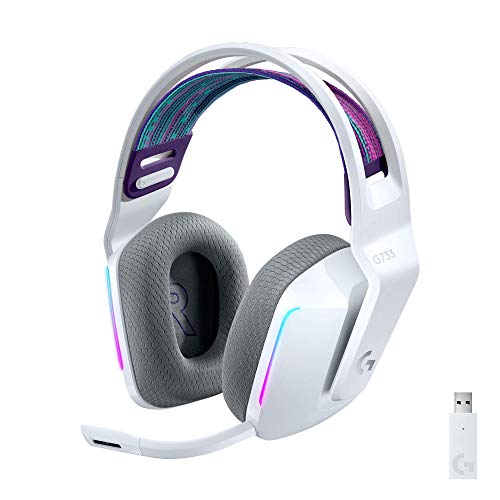
The 5 Best Gaming Headsets on a Budget
Five lower-cost gaming headsets compared by connection, microphone, comfort and platform fit.
The 5 Best Wireless Gaming Headsets
Five wireless gaming headsets, including Ozeino Wireless Gaming Headset and Logitech G733 Lightspeed, compared by platform compatibility, microphone, wireless link, comfort.