The 5 Best Headphones for PC Gaming
For PC gaming, I would decide how I connect the headset before comparing surround-sound labels. A cable removes battery management and often works with more devices; a wireless receiver frees you from the desk but uses a port and needs charging. The microphone matters every time you join a call, so check its placement and mute control too.
Ozeino is the low-cost wireless start. Logitech G733 is the more established receiver-based option, Razer Barracuda X crosses between gaming and mobile use, and UG-08S gives more connection modes. HyperX Cloud III is my wired fallback for someone who values a dependable cable. Check the exact PC ports and included dongle before buying any wireless model.
Our top 5 headphones for pc gaming
Swipe to compare price, rating and best use →
| Product | Price | Rating | Best for |
|---|---|---|---|
01 Ozeino Wireless Gaming HeadsetDetails ↓ Ozeino Wireless Gaming HeadsetDetails ↓ | $29.98 | 4.3/5Amazon | Best inexpensive wireless start |
02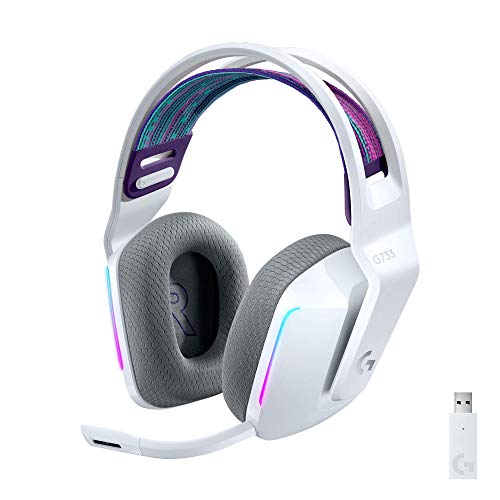 Logitech G733 LightspeedDetails ↓ Logitech G733 LightspeedDetails ↓ | $109.99 | 4.4/5Amazon | Best established wireless PC set |
03 Razer Barracuda XDetails ↓ Razer Barracuda XDetails ↓ | $69.00 | 4.2/5Amazon | Best PC-to-mobile crossover |
04 Valorise UG-08S Wireless Gaming HeadsetDetails ↓ Valorise UG-08S Wireless Gaming HeadsetDetails ↓ | $44.99 | 4.4/5Amazon | Best multiple-connection budget choice |
05 HyperX Cloud III WiredDetails ↓ HyperX Cloud III WiredDetails ↓ | $69.99 | 4.3/5Amazon | Best dependable wired choice |
01 — Ozeino
Best inexpensive wireless startOzeino Wireless Gaming Headset
I would start with Ozeino for a casual PC player who wants to leave the desk without dragging a cable and still needs a boom mic for chat. Its low entry price is the point; I would check the receiver and PC compatibility before believing any virtual-surround promise.
It leads on accessible wireless value, not premium sound claims. Build, battery and microphone expectations should match the price. HyperX is the clearer long-term choice if charging is more annoying than a wire; Logitech is the established wireless step up.
Specifications: Exact Amazon product listing ↗
View on Amazon ↗Casual players who want low-cost wireless chat.
You prefer a cable and no battery routine.
What I like
+Accessible wireless-and-mic package.
What to weigh
−Compatibility and microphone quality need checking.
02 — Logitech G
Best established wireless PC setLogitech G733 Lightspeed
G733 is the headset I would compare for someone who games frequently and wants a 2.4 GHz receiver, suspended headband and detachable mic. Its wireless routine has a clearer purpose than paying for lighting alone.
Second place reflects a higher price and charging requirement. Check the included receiver, supported platforms and whether the fabric headband suits your fit. If you also move regularly between phone and PC, Barracuda X has the more relevant connection story.
Specifications: Exact Amazon product listing ↗
View on Amazon ↗Frequent PC gaming with a receiver-based setup.
You want a simple wired headset.
What I like
+Established receiver-based wireless format.
What to weigh
−Charging and USB receiver management.
03 — Razer
Best PC-to-mobile crossoverRazer Barracuda X
I would look at Barracuda X when one headset must move between a PC and a phone or portable console. The practical question is which connections this exact generation includes; model revisions can change compatibility.
It ranks third because a cross-device design may be less relevant to someone who never leaves the PC. Confirm dongle, cable and Bluetooth support from the exact ASIN. For a stationary desk, a wired Cloud III is simpler.
Specifications: Exact Amazon product listing ↗
View on Amazon ↗Gamers who move a headset among devices.
Your headset stays plugged into one PC.
What I like
+Multi-device use case.
What to weigh
−Exact generation and connection bundle need verification.
04 — Valorise
Best multiple-connection budget choiceUG-08S Wireless Gaming Headset
UG-08S is the one I would inspect if the same desk uses a receiver connection and Bluetooth at different times. The retractable microphone may appeal when switching from calls to listening, and its stated runtime gives a starting comparison.
Fourth place reflects the need to verify how each mode works with your devices. A long advertised battery life can depend on lighting and microphone use. Logitech has a clearer established PC wireless role; Cloud III avoids mode switching entirely.
Specifications: Exact Amazon product listing ↗
View on Amazon ↗Budget buyers who need receiver and Bluetooth modes.
You want the simplest no-battery setup.
What I like
+Several connection paths.
What to weigh
−Mode compatibility and runtime vary.
- Wireless
- 2.4 GHz receiver and Bluetooth 5.4
- Microphone
- Retractable with mute
- Runtime
- Up to 45 hours in receiver mode with lighting and microphone
05 — HyperX
Best dependable wired choiceHyperX Cloud III Wired
I would choose Cloud III if my PC desk is fixed and I never want to find a charged headset before a session. The detachable microphone and cable make the daily routine obvious; I would check plug type and cable reach against the computer.
It finishes fifth only because this shortlist begins with wireless buyers. A cable is also its limitation if you move around the room. Do not judge mic quality from a brand label alone; compare samples recorded from this exact wired model.
Specifications: Exact Amazon product listing ↗
View on Amazon ↗Stationary PC players who prefer no charging.
You need to walk away from the desk while talking.
What I like
+Simple wired connection and detachable mic.
What to weigh
−Cable limits movement.
Price information
Amazon price and availability checked Oct 18, 2026, 12:06 AM Lisbon time. Prices and availability are subject to change; the information shown on Amazon.com at purchase applies.
Our process
How we picked.
We compare five relevant products for different needs, using documented specifications, clear use cases and practical trade-offs. Our goal is to make the differences clear and help you choose with confidence.
- 01Relevance
Each product must fit the guide’s intended use, audience and requirements.
- 02Specifications
We compare the key product details that meaningfully affect the buying decision.
- 03Use case and fit
We compare the intended use, configuration and practical fit of every selected product.
- 04Strengths and limitations
We explain where each option performs best and the compromises to consider.
Good questions
FAQ — Headphones for PC Gaming
01Is Bluetooth enough for competitive PC gaming?+
Bluetooth support and latency vary by headset and computer. A compatible 2.4 GHz receiver or cable is generally the clearer choice when delayed game audio would bother you.
02Do I need virtual surround sound?+
Not necessarily. Good stereo positioning and a comfortable fit matter first. Some virtual modes require software, so confirm the exact model and operating system.
The short answer
Start with the Ozeino Wireless Gaming Headset.
I recommend it for casual players who want low-cost wireless chat. Choose something else if you prefer a cable and no battery routine.
View on Amazon ↗Keep looking
Related guidesThe 5 Best Gaming Headset for Pc
Five PC gaming headsets, compared by wired or wireless connection, microphone setup and comfort.

The 5 Best Headphones for Xbox
Five Xbox Headphones, including BENGOO and Ozeino, compared for fit, connection and listening use.
The 5 Best Gaming Headsets for Wired and Wireless Play
Five HyperX, Razer, Logitech, NUBWO and BENGOO headsets for wired play, PC desks or mobile gaming.

The 5 Best Headphones for PC
Five headphones for pc, led by Bose QuietComfort and Audio-Technica ATH-M50X, selected for connection, comfort and microphone options.
The 5 Best Headphones for Different Listening Habits
Five Soundcore, Audio-Technica, Sony, Skullcandy and TOZO headphones for commuting, wired desks or a spare.