5 Best Mesh Wi-Fi Systems
A mesh kit helps when the signal disappears in rooms a single router cannot reach. I would map the dead zones first, then check how many nodes the box actually includes. A lone mesh-capable router is a starting node, not instant whole-home coverage; walls, placement and the link between nodes still matter.
The Deco X15 three-pack is the most direct answer for several rooms. Eero 6 is a simpler first node for a smaller home, while Pro 6E asks you to pay for a compatible faster network. Eero Outdoor 7 has a specific outdoor job, and Deco 7 is for buyers planning a newer Wi-Fi 7 setup. The right choice depends more on the house and wired connections than an advertised coverage circle.
Our top 5 mesh wi-fi systems
Swipe to compare price, rating and best use →
| Product | Price | Rating | Best for |
|---|---|---|---|
01 TP-Link Deco X15 Three-PackDetails ↓ TP-Link Deco X15 Three-PackDetails ↓ | $110.70 | 4.4/5Amazon | Best multiroom starting kit |
02 eero Amazon eero 6Details ↓ eero Amazon eero 6Details ↓ | $89.99 | 4.4/5Amazon | Best simple first mesh node |
03 eero Amazon eero Pro 6EDetails ↓ eero Amazon eero Pro 6EDetails ↓ | $199.99 | 4.3/5Amazon | Best 6GHz Eero upgrade |
04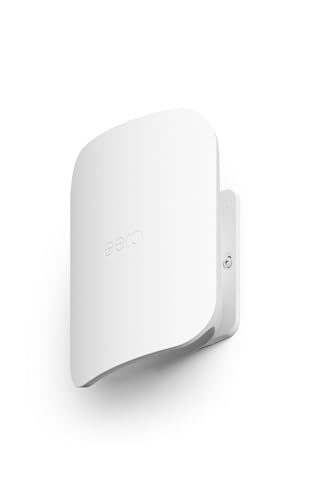 eero Amazon eero Outdoor 7Details ↓ eero Amazon eero Outdoor 7Details ↓ | $399.99 | 4.5/5Amazon | Best outdoor mesh extension |
05 TP-Link Deco 7 BE5000Details ↓ TP-Link Deco 7 BE5000Details ↓ | $249.99 | 4.3/5Amazon | Best Wi-Fi 7 path |
01 — TP-Link
Best multiroom starting kitTP-Link Deco X15 Three-Pack
I would start with the Deco X15 three-pack if Wi-Fi fades at the far end of a house. Three included nodes are a more honest multiroom purchase than buying one powerful router and hoping it crosses several walls. Place them where they can still hear one another or use wired backhaul where the installation allows.
It takes first place for the coverage problem this guide is meant to solve. The trade-off is finding power and a sensible location for each unit. Check the exact pack quantity and Ethernet needs before comparing a three-pack price with a single Eero node.
Specifications: Exact Amazon product listing ↗
View on Amazon ↗Homes with several rooms and known weak spots.
One centrally located router already covers the home.
What I like
+Three-node Wi-Fi 6 mesh kit.
What to weigh
−More placement and power points to manage.
02 — eero
Best simple first mesh nodeAmazon eero 6
Eero 6 is a sensible first node for a smaller home or for someone who already owns compatible Eero gear. I would use it where the app-led setup matters more than chasing a newer radio label, then add a node only if the far room still struggles.
It ranks second because a single router cannot promise the coverage of the Deco three-pack. Confirm what is included in this exact offer and what features require an account or subscription. Adding nodes later can change the total cost substantially.
Specifications: Exact Amazon product listing ↗
View on Amazon ↗Smaller homes or existing Eero households.
You need a ready-made three-node kit.
What I like
+Simple mesh-capable Wi-Fi 6 entry.
What to weigh
−One node may leave dead zones.
- ProductType
- wifi router
03 — eero
Best 6GHz Eero upgradeAmazon eero Pro 6E
I would consider Pro 6E when the home already has devices that can use 6GHz and internet or local-network demands justify the upgrade. It is a different purchase from adding basic coverage: the radio can help compatible devices, but distance and walls still set limits.
Third place reflects that narrower audience. If the main problem is a bedroom with no signal, spend on node placement before a faster single node. Check the exact included-unit count and Ethernet port requirements for your provider.
Specifications: Exact Amazon product listing ↗
View on Amazon ↗Homes with compatible 6GHz devices and a faster network.
Your main problem is basic coverage in several rooms.
What I like
+Wi-Fi 6E capability for suitable devices.
What to weigh
−Premium cost without guaranteed extra reach.
- ProductType
- wifi router
04 — eero
Best outdoor mesh extensionAmazon eero Outdoor 7
Outdoor 7 has a clear job: carrying a compatible Eero network toward a patio or yard where an indoor node is poorly placed. I would only put it on the list for an owner who can plan its mounting and power route safely.
It sits fourth because most buyers need indoor coverage first. This is an extension with installation constraints, not a replacement for the main modem or home router. Verify its power and mounting requirements and compatibility with existing Eero equipment.
Specifications: Exact Amazon product listing ↗
View on Amazon ↗An existing Eero home needing outdoor reach.
You are building an indoor network from scratch.
What I like
+Purpose-built outdoor mesh role.
What to weigh
−Requires installation planning and compatible network.
- ProductType
- router
05 — TP-Link
Best Wi-Fi 7 pathTP-Link Deco 7 BE5000
Deco 7 is the forward-looking option when you are replacing the network for newer Wi-Fi 7 devices and want TP-Link’s mesh approach. I would inspect this exact package before ordering: a listing for one unit and a listing for a multi-pack solve different coverage problems.
It closes the ranking because a new standard is not automatically a better answer to a dead zone. If the house needs three nodes now, the X15 kit may be the cleaner purchase. Check device support, ports and included unit count before paying for the Wi-Fi 7 label.
Specifications: Exact Amazon product listing ↗
View on Amazon ↗Buyers planning a compatible newer mesh network.
You need known three-node coverage on a tighter budget.
What I like
+Wi-Fi 7 upgrade route.
What to weigh
−Pack quantity and client support determine value.
Price information
Amazon price and availability checked Oct 17, 2026, 10:16 PM Lisbon time. Prices and availability are subject to change; the information shown on Amazon.com at purchase applies.
Our process
How we picked.
We compare five relevant products for different needs, using documented specifications, clear use cases and practical trade-offs. Our goal is to make the differences clear and help you choose with confidence.
- 01Relevance
Each product must fit the guide’s intended use, audience and requirements.
- 02Specifications
We compare the key product details that meaningfully affect the buying decision.
- 03Use case and fit
We compare the intended use, configuration and practical fit of every selected product.
- 04Strengths and limitations
We explain where each option performs best and the compromises to consider.
Good questions
FAQ — Mesh Wi-Fi Systems
01Is one mesh router the same as a mesh system?+
No. One node may work as a router, but extending coverage usually needs additional compatible nodes. Check the number of units in the exact Amazon offer.
02Do I need a separate modem with mesh Wi-Fi?+
Usually you still need the equipment that connects to your internet provider. Check the provider’s modem or gateway requirements and whether bridge mode or double NAT matters in your setup.
The short answer
Start with the TP-Link Deco X15 Three-Pack.
I recommend it for homes with several rooms and known weak spots. Choose something else if one centrally located router already covers the home.
View on Amazon ↗Keep looking
Related guides
The 5 Best Laptops under $500
Five laptops under $500, chosen for useful everyday features, credible performance and a more sensible price.
5 Best System for Large Homes Mesh Wi-fi Systems
Five system for large homes mesh wi-fi systems, including TP-Link and eero, compared by node count, backhaul and coverage claims.

The 5 Best Mesh Wi-Fi Systems for Large Home
Five Mesh Wi-Fi For Large Home compared by node count, wired ports and coverage, with distinct products for different uses.
The 5 Best Wi-Fi 7 Mesh Systems
Five Wi-Fi 7 mesh systems compared by backhaul, node count, wired ports and coverage.