The 5 Best Monitors under $300
Under $300, the screen you choose should match the work you do all day. A 32-inch QHD desktop gives you generous space but less crisp text per inch than a 27-inch QHD screen. A faster gaming panel is worth paying for if the computer can feed it; a portable display solves a completely different problem. I would check resolution, stand and ports before treating a larger diagonal as an upgrade.
LG's 32-inch QHD is my general desk pick for the workspace it buys at this price. ASUS's 27-inch QHD is sharper and faster for play; LG's 27-inch Full HD is a lower-cost office screen. Amazon Basics is the simplest budget alternative, while Lenovo's L15 is for a second screen that travels. One important catch: the 32-inch LG's USB-C port supplies only 15W, so it is not a one-cable laptop charging dock.
Our top 5 monitors under $300
Swipe to compare price, rating and best use →
| Product | Price | Rating | Best for |
|---|---|---|---|
01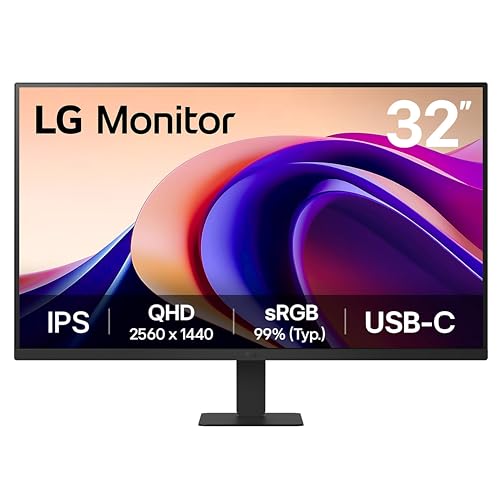 LG 32U631A-B 32-inch QHDDetails ↓ LG 32U631A-B 32-inch QHDDetails ↓ | $249.99 | 4.3/5Amazon | Best spacious work display |
02 ASUS TUF Gaming VG27AQ3ADetails ↓ ASUS TUF Gaming VG27AQ3ADetails ↓ | $179.00 | 4.6/5Amazon | Best QHD gaming value |
03 LG 27U411A-B Full HDDetails ↓ LG 27U411A-B Full HDDetails ↓ | $104.99 | 4.6/5Amazon | Best simple 27-inch office screen |
04 Amazon Basics 27-inch Full HDDetails ↓ Amazon Basics 27-inch Full HDDetails ↓ | $99.99 | 4.6/5Amazon | Best basic spare monitor |
05 Lenovo L15 15.6-inchDetails ↓ Lenovo L15 15.6-inchDetails ↓ | $181.43 | 4.2/5Amazon | Best portable second screen |
01 — LG
Best spacious work displayLG 32U631A-B 32-inch QHD
The 32U631A-B makes sense for someone who wants two documents side by side or a large timeline without stepping into 4K prices. LG lists a 2560 × 1440 panel and up to 100Hz. That resolution is spread over 32 inches, so small text is less dense than on the 27-inch ASUS. Its USB-C connection offers only 15W power delivery: plan a separate laptop charger.
It leads for a roomy general desk at a verified price below $300. I would buy the ASUS instead for crisper QHD text at 27 inches or faster gaming. The LG is a screen-space purchase, not a promise of a single-cable workstation.
Specifications: LG 32U631A-B specifications ↗
View on Amazon ↗Desk work that benefits from a broad canvas.
You need laptop charging from the monitor.
What I like
+Large QHD workspace and 100Hz refresh.
What to weigh
−Lower pixel density and only 15W USB-C power.
- Display
- 32 in 2560 × 1440 IPS
- Refresh rate
- 100 Hz
- USB-C power
- Up to 15 W
02 — ASUS
Best QHD gaming valueASUS TUF Gaming VG27AQ3A
ASUS's 27-inch VG27AQ3A is the better buy for a desk used for both detailed text and responsive games. It keeps QHD in a denser 27-inch frame and ASUS lists refresh up to 180Hz. Make sure your computer, cable and selected input support the refresh rate you expect; the headline number alone does not create more game frames. Its gaming-oriented styling is a trade for a plain office setup.
Second place reflects a specialist advantage at a lower current price than the large LG. I would move it to first for a gaming PC, but keep LG ahead for someone mainly arranging large windows. Compare ergonomics and port needs before buying on refresh rate alone.
Specifications: ASUS VG27AQ3A product details ↗
View on Amazon ↗PC players who also read and work.
You want the largest workspace at normal scaling.
What I like
+Dense QHD panel with high refresh.
What to weigh
−Smaller canvas than 32 inches.
- Display
- 27 in 2560 × 1440 IPS
- Refresh rate
- 180 Hz
- Mount
- 100 × 100 mm VESA
03 — LG
Best simple 27-inch office screenLG 27U411A-B Full HD
LG's 27U411A-B is a straightforward second desk screen when the budget matters more than fine text. Its Full HD panel spreads 1920 × 1080 pixels over 27 inches, which is visibly less crisp for spreadsheets and small fonts than either QHD pick. The listed 120Hz refresh can make everyday pointer movement smoother, but it does not restore missing pixel detail.
Third place is for someone who wants a familiar 27-inch brand at a much lower price. I would stretch to ASUS QHD if reading dense documents for hours. Buy this LG for ordinary calls, video and roomy large-type work, with realistic expectations about resolution.
Specifications: LG 27U411A-B specifications ↗
View on Amazon ↗Budget office users who prefer large text.
You edit fine detail or dense spreadsheets.
What I like
+Affordable 27-inch screen with 120Hz.
What to weigh
−Full HD looks coarse at this size.
- Display
- 27 in 1920 × 1080 IPS
- Refresh rate
- 120 Hz
- Stand
- Tilt adjustable
04 — Amazon Basics
Best basic spare monitorAmazon Basics 27-inch Full HD
The Amazon Basics 27-inch IPS is the no-frills choice for an extra display used for email, video calls or a home admin desk. Full HD at this size shares the LG's text-density compromise. Check the exact stand adjustment, input ports and return terms on this current listing; a low panel price is less attractive if you have to add an arm or an adapter immediately.
Fourth place makes sense only when its lower current price pays for those limitations. I would choose the LG 27U411A-B if its documented refresh and ports better fit the computer. Neither budget Full HD option competes with ASUS for fine text or fast play.
Specifications: Exact Amazon product listing ↗
View on Amazon ↗A secondary screen at the lowest spend.
One screen must handle detailed daily work.
What I like
+Low entry price for 27 inches.
What to weigh
−Basic ergonomics and coarse Full HD text.
- Display
- 27 in 1920 × 1080 IPS
- Inputs
- HDMI and DisplayPort
- Audio
- Two 2 W speakers
05 — Lenovo
Best portable second screenLenovo L15 15.6-inch
Lenovo's L15 is for someone who needs a second Full HD screen in a bag, not another permanent 27-inch desktop display. Its 15.6-inch size is far easier to carry and also means much less room for side-by-side windows. Confirm that your laptop's USB-C port supports video output and provides the needed power before assuming one cable will work.
It ranks fifth in a desk-monitor list because portability is a separate use case. I would buy it for repeated travel or shared desks; I would buy any of the larger fixed screens for a home office. The right connector matters more than the fact that both laptops and this display have USB-C sockets.
Specifications: Lenovo L15 product details ↗
View on Amazon ↗Travellers and flexible desks needing a second display.
You work only at a permanent home desk.
What I like
+Light, compact 15.6-inch Full HD format.
What to weigh
−Small canvas and USB-C compatibility check.
- Display
- 15.6 in 1920 × 1080 IPS
- Connections
- Two USB-C ports
- Stand
- Height adjustment
Price information
Amazon price and availability checked Oct 17, 2026, 10:28 PM Lisbon time. Prices and availability are subject to change; the information shown on Amazon.com at purchase applies.
Our process
How we picked.
We compare five relevant products for different needs, using documented specifications, clear use cases and practical trade-offs. Our goal is to make the differences clear and help you choose with confidence.
- 01Relevance
Each product must fit the guide’s intended use, audience and requirements.
- 02Specifications
We compare the key product details that meaningfully affect the buying decision.
- 03Use case and fit
We compare the intended use, configuration and practical fit of every selected product.
- 04Strengths and limitations
We explain where each option performs best and the compromises to consider.
Good questions
FAQ — Monitors under $300
01Is 32-inch QHD sharper than 27-inch QHD?+
No. Both have 2560 × 1440 pixels, so the 27-inch panel packs them more tightly and generally renders text more crisply at the same viewing distance.
02Will the USB-C monitor charge my laptop?+
Check the stated power delivery. LG lists only 15W for the 32U631A-B, too little to count on for most working laptops.
The short answer
Start with the LG 32U631A-B 32-inch QHD.
I recommend it for desk work that benefits from a broad canvas. Choose something else if you need laptop charging from the monitor.
View on Amazon ↗Keep looking
Related guides
The 5 Best Monitors for Programming
Five monitors, compared by multi-window layouts, debugging panels and document viewing.

The 5 Best LG Monitors
Five lg monitors compared by native resolution, stand adjustment and connection needs.
The 5 Best Monitors under $200
Five monitors, compared by screen size, resolution and useful features below $200.