The 5 Best Tablet for Kids
For a child's tablet, I care more about what happens after the first week than the processor line on the box. Can a parent approve apps, set limits, replace a cracked case and get software updates? A cheap Android tablet can be fine for a few downloaded videos, but its low purchase price stops looking good if the apps you need will not run or the parent controls are hard to manage.
The Fire HD 8 Kids is my clear first pick because Amazon documents its child profiles, parental controls and two-year worry-free guarantee. The four lower-cost Android packages may suit an older child with a narrow use case, but I would verify the exact app store, update policy, case and charger before ordering. My ranking reflects that uncertainty rather than pretending that five colorful cases offer the same family experience.
Our top 5 tablet for kids
Swipe to compare price, rating and best use →
| Product | Price | Rating | Best for |
|---|---|---|---|
01 Amazon Fire HD 8 KidsDetails ↓ Amazon Fire HD 8 KidsDetails ↓ | $99.99 | 4.6/5Amazon | Best supported kids ecosystem |
02 COLORROOM Kids TabletDetails ↓ COLORROOM Kids TabletDetails ↓ | $89.99 | 4.2/5Amazon | Best low-cost Android trial |
03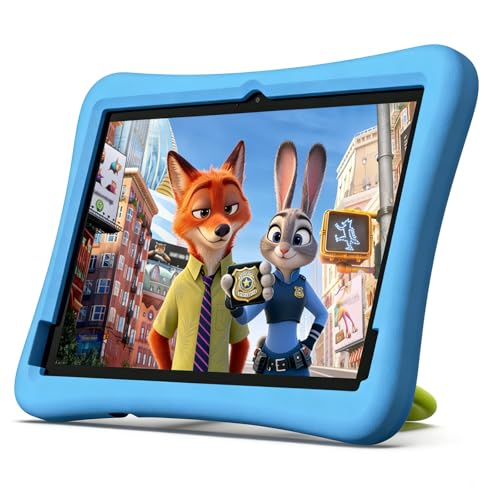 Plimpton 10-inch Kids TabletDetails ↓ Plimpton 10-inch Kids TabletDetails ↓ | $129.00 | 4.2/5Amazon | Best larger-screen Android option |
04 SHARECLOUD 10-inch Kids TabletDetails ↓ SHARECLOUD 10-inch Kids TabletDetails ↓ | $139.99 | 4.3/5Amazon | Best alternative ten-inch bundle |
05 aiprotablet 10-inch Kids TabletDetails ↓ aiprotablet 10-inch Kids TabletDetails ↓ | $129.97 | 4.3/5Amazon | Best only for a verified app fit |
01 — Amazon
Best supported kids ecosystemAmazon Fire HD 8 Kids
Fire HD 8 Kids is the one I would give to a younger child if simple adult oversight matters more than installing any Android app. Amazon documents child profiles, parent controls and a two-year worry-free guarantee for the Kids package. Check the exact generation and included case on this listing. Its Amazon app ecosystem is the real compromise if school or family apps require Google Play.
It leads despite the higher current price because the supported family setup and replacement promise have a clear use beyond the hardware. I would choose a standard Android tablet only after confirming every required app and how updates and restrictions work on that exact model.
Specifications: Amazon child profile and parent controls help ↗
View on Amazon ↗Younger children with managed content needs.
Google Play-only apps are essential.
What I like
+Documented child controls and replacement cover.
What to weigh
−Amazon app ecosystem and higher price.
02 — COLORROOM
Best low-cost Android trialCOLORROOM Kids Tablet
COLORROOM is a lower-cost Android package for a family that knows the two or three apps it needs and is willing to check them before purchase. The listing's Android version and case claims need confirmation on the exact shipped unit. I would ask about software-update support and replacement parts; a bright protective shell does not answer either question.
Second place is a price-based alternative for a narrow task, not a claim that its parental setup matches Fire Kids. I would use it for supervised media and simple games only after verifying the app store. If the tablet must last through years of school use, the lack of a clear update promise is a serious trade.
Specifications: Exact Amazon product listing ↗
View on Amazon ↗Families trying a few known apps cheaply.
Long update support is a requirement.
What I like
+Lower purchase price and child-style case.
What to weigh
−App store and update policy need checking.
03 — plimpton
Best larger-screen Android optionPlimpton 10-inch Kids Tablet
Plimpton's ten-inch format gives children more room for drawing or watching with a parent than an eight-inch tablet. That is a real benefit only if its screen, case and software meet your needs; the larger glass area also makes it less handy for little hands. Confirm its exact app store, memory configuration and replacement-case availability on the current package before buying.
Third place is for a larger shared screen, not for a better supported platform. I would choose the smaller Fire for younger children who need managed profiles and the documented guarantee. The Plimpton is more plausible for an older child who can use the extra display area under supervision.
Specifications: Exact Amazon product listing ↗
View on Amazon ↗Older children needing a larger display.
Small hands or stronger support matter most.
What I like
+Ten-inch viewing area.
What to weigh
−Larger, less portable and update terms unclear.
04 — SHARECLOUD
Best alternative ten-inch bundleSHARECLOUD 10-inch Kids Tablet
SHARECLOUD is another ten-inch Android bundle for supervised streaming and simple offline activities. The useful question is whether the apps and parental settings in the actual delivered unit match your household's needs. I would verify the app store, charging connector, case fit and software update policy before letting the low listed price decide the purchase.
Fourth place reflects how little in the documented package separates it from the other generic Android options. Choose it only if its exact accessories or verified app setup beat Plimpton at the current price. For a younger child, Fire remains the easier recommendation.
Specifications: Exact Amazon product listing ↗
View on Amazon ↗Parents comparing a specific low-cost bundle.
You need documented long-term support.
What I like
+Larger screen at a modest price.
What to weigh
−Software and accessory support remain uncertain.
05 — aiprotablet
Best only for a verified app fitaiprotablet 10-inch Kids Tablet
The aiprotablet ten-inch package may work for a family with a fixed list of basic apps, but I would not buy it from the headline specifications alone. Check the exact Google services, child-account controls, case and charger in the current listing, then look for a written update commitment. The displayed price overlaps better-defined alternatives, which weakens its value case.
It closes the list because I cannot justify moving it above Fire or the cheaper Android bundles on documented family support. If this exact tablet runs a school-required app the others cannot, that may reverse the order for your family; verify that before ordering.
Specifications: AAP family media plan guidance ↗
View on Amazon ↗Families with a verified model-specific app need.
You want the safest general first purchase.
What I like
+Potentially large low-cost display.
What to weigh
−Unclear long-term software value.
Price information
Amazon price and availability checked Oct 17, 2026, 10:23 PM Lisbon time. Prices and availability are subject to change; the information shown on Amazon.com at purchase applies.
Our process
How we picked.
We compare five relevant products for different needs, using documented specifications, clear use cases and practical trade-offs. Our goal is to make the differences clear and help you choose with confidence.
- 01Relevance
Each product must fit the guide’s intended use, audience and requirements.
- 02Specifications
We compare the key product details that meaningfully affect the buying decision.
- 03Use case and fit
We compare the intended use, configuration and practical fit of every selected product.
- 04Strengths and limitations
We explain where each option performs best and the compromises to consider.
Good questions
FAQ — Tablet for Kids
01Can every child tablet run the same apps?+
No. Check the exact app store and the specific apps your child needs. Amazon Fire uses Amazon’s ecosystem; a generic Android listing may not include every Google service.
02Are tablet parental controls enough on their own?+
No. Use device controls alongside family rules about content, time and where screens are used; the American Academy of Pediatrics offers a family media-plan tool.
The short answer
Start with the Amazon Fire HD 8 Kids.
I recommend it for younger children with managed content needs. Choose something else if google play-only apps are essential.
View on Amazon ↗Keep looking
Related guides
The 5 Best Mechanical Keyboard for Typing
Five mechanical keyboards for typing, including Logitech G413 SE Full-Size and Redragon K556 Wired RGB, compared by switch feel, key layout, noise, connection.

The 5 Best Wireless Mouse
Five wireless mice, including Logitech G305 Lightspeed and Logitech M185 Compact, compared by hand shape, connection, battery, programmable controls.

The 5 Best Wireless Gaming Mice
Five Logitech, UtechSmart and Razer mice for shortcut-heavy games, simple wireless play and lighter shooter grips.