5 Best 5K Monitors
The monitor I would choose for writing and photo editing is different from the one I would choose for a video timeline. That was the first thing I had to sort out while comparing these 5K displays. A 27-inch screen makes small text and image detail look finer; a nearly 40-inch ultrawide gives a timeline, browser and notes room to sit together. Both can say “5K” on the box, but they change your working day in different ways.
For most people who want a sharper version of a familiar 27-inch desk, I would start with the KTC H27P3. Its native 5K mode is the reason to buy it; the advertised 120 Hz mode runs at a lower resolution. If I spent my day arranging long timelines or several windows, I would make space for the Dell U4025QW instead. I would choose the Samsung ViewFinity S8 for a desk shared by two computers, and the BenQ PD2730S when a documented color workflow matters more than general office features.
The InnoView is here for a narrower reason: its built-in stand makes a full-size screen easier to move between desks. For each pick, I compared the published display modes, ports, laptop charging and the documentation behind its claims. The reviews below explain where I think each monitor earns its place, and what you give up by choosing it.
Our top 5 5k monitors
Swipe to compare price, rating and best use →
| Product | Price | Rating | Best for |
|---|---|---|---|
01 KTC H27P3Details ↓ KTC H27P3Details ↓ | $609.99 | 4.4/5Amazon | Best everyday 5K |
02 Dell UltraSharp U4025QWDetails ↓ Dell UltraSharp U4025QWDetails ↓ | $1,424.99 | 4.5/5Amazon | Best ultrawide workspace |
03 Samsung ViewFinity S8 S80HF 27-inch 5KDetails ↓ Samsung ViewFinity S8 S80HF 27-inch 5KDetails ↓ | $699.99 | 4.2/5Amazon | Best one-cable office hub |
04 BenQ DesignVue PD2730S 5K MonitorDetails ↓ BenQ DesignVue PD2730S 5K MonitorDetails ↓ | $1,099.99 | 3.8/5Amazon | Best for color-managed creative work |
05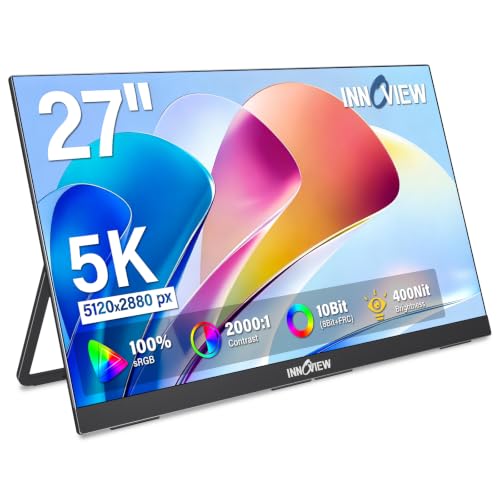 InnoView 27-inch 5K Portable MonitorDetails ↓ InnoView 27-inch 5K Portable MonitorDetails ↓ | $629.99 | 4.3/5Amazon | Best for a movable full-size setup |
01 — KTC
Best everyday 5KKTC H27P3
I put the KTC H27P3 first because it answers the clearest 5K buying brief: put 14.7 million pixels into a normal 27-inch desktop for crisp text, detailed still images and room for several tool palettes. From the published size and resolution, that works out to about 218 pixels per inch. KTC also publishes a useful second mode, 2560 × 1440 at 120 Hz, for someone who occasionally prefers smoother motion.
That second mode is the decision point, not a free bonus: QHD has 3.7 million pixels, 75% fewer than native 5K. The 120 Hz headline therefore cannot be read as “120 Hz at 5K.” KTC’s own port table also limits HDMI to 3840 × 2160 at 60 Hz; it lists native 5K through DisplayPort and USB-C. USB-C charging tops out at 65 W, 25 W below the Samsung S8, and there is no KVM. I would buy it for sharp daily work, but only after matching my computer to the right input.
Specifications: KTC display modes and ports ↗
View on Amazon ↗Sharp everyday work on a conventional 27-inch desk.
You need native 5K above 60 Hz, Ethernet or more than 65 W charging.
What I like
+Roughly 218 ppi on a conventional 27-inch panel.
+A separate 120 Hz mode gives a genuine choice between detail and motion.
What to weigh
−120 Hz is available at QHD, with 75% fewer pixels than 5K.
−HDMI is specified up to 4K/60; use DP or USB-C for native 5K.
- Native mode
- 5120 × 2880 at 60 Hz (KTC)
- Pixel density
- About 218 ppi (calculated)
- Fast mode
- 2560 × 1440 at 120 Hz (KTC)
- HDMI maximum
- 3840 × 2160 at 60 Hz (KTC)
- USB-C power
- Up to 65 W (KTC)
02 — Dell
Best ultrawide workspaceDell UltraSharp U4025QW
I would take the Dell U4025QW over the KTC for a video timeline, a wide spreadsheet or two full-size windows that I do not want to keep rearranging. Dell lists a 36.59-inch visible screen width; a 27-inch 16:9 panel is about 23.5 inches wide by calculation. That is roughly 13 extra inches of horizontal canvas. The 120 Hz panel, Thunderbolt 4 hub, wired networking and up to 140 W of laptop power make it a credible one-screen workstation rather than simply a larger display.
I keep it second because the extra width comes with less fine detail. Its 5120 × 2160 panel contains 11.1 million pixels versus 14.7 million on native 27-inch 5K, and Dell publishes 140 ppi versus about 218 ppi for the 27-inch models. Text may still look good at a sensible viewing distance, but I would not pay for this screen expecting the same tight pixel structure as a Studio Display-size panel. Measure your desk first, and choose it for space and docking rather than for maximum sharpness.
Specifications: Dell U4025QW specifications ↗
View on Amazon ↗Wide timelines and side-by-side windows on a large desk.
You want 27-inch 5K sharpness or cannot spare the desk space.
What I like
+About 13 inches more visible width than a 27-inch 16:9 screen.
+120 Hz, Thunderbolt 4, networking and up to 140 W charging.
What to weigh
−140 ppi is far below the roughly 218 ppi of 27-inch 5K.
−The wide curved panel needs a substantial desk and viewing distance.
- Panel
- 39.7 in; 5120 × 2160 at up to 120 Hz (Dell)
- Pixel density
- 140 ppi (Dell)
- Visible width
- 36.59 in (Dell)
- Thunderbolt power
- Up to 140 W (Dell)
03 — Samsung
Best one-cable office hubSamsung ViewFinity S8 S80HF 27-inch 5K
I would pick the Samsung ViewFinity S8 S80HF for a desk with a work laptop, a personal computer and one set of peripherals. The native 27-inch 5120 × 2880 panel gives the same calculated 218 ppi class as the KTC, while Samsung lists 90 W USB-C power, Ethernet and a KVM switch. That is 25 W more advertised charging headroom than the KTC, and the KVM can remove the daily cable-and-keyboard shuffle.
Third place reflects how specific that benefit is. The S8 does not create more detail than another 27-inch 5K screen; Samsung lists 60 Hz and no integrated speakers. I would spend more on it only if the network connection and two-computer workflow replace something I already need on the desk. For a single computer with a good dock, I see less reason to choose it over the first pick.
Specifications: Samsung ViewFinity S8 specifications ↗
View on Amazon ↗A two-computer laptop desk needing 5K, charging and Ethernet.
You have one computer or need a high-refresh gaming display.
What I like
+90 W USB-C, Ethernet and KVM in a native 27-inch 5K display.
+25 W more stated USB-C power than the KTC.
What to weigh
−60 Hz is a poor match for someone buying primarily for motion.
−No integrated speakers; hub features add little to a one-computer desk.
- Native mode
- 5120 × 2880 at 60 Hz (Samsung)
- Pixel density
- About 218 ppi (calculated)
- USB-C power
- Up to 90 W (Samsung)
- Desk connections
- Ethernet and KVM (Samsung)
04 — BenQ
Best for color-managed creative workDesignVue PD2730S 5K Monitor
I would move the BenQ PD2730S above the office picks for a photographer, designer or editor whose work is delivered in a managed color space. BenQ specifies a 27-inch 5120 × 2880 panel, 98% P3 coverage, a factory calibration report, uniformity controls, KVM and Thunderbolt 4 charging up to 90 W. The report matters more to me than the bare “98% P3” headline: gamut describes the range of colors, while calibration addresses how closely the screen renders them.
It is fourth in this general list because those safeguards are expensive features to leave unused. BenQ publishes an average Delta E of 2 or less as a factory target, but that is its specification, not a measurement I made. I would inspect the report shipped with the actual unit and calibrate the finished workstation for client work. With no color-managed workflow, a 60 Hz BenQ has a weaker case than a simpler 27-inch 5K screen or the Dell’s larger workspace.
Specifications: BenQ PD2730S specifications ↗
View on Amazon ↗A fixed 5K desk for design, photography or color-managed work.
You need high-refresh gaming or only basic office display features.
What I like
+Factory calibration report and uniformity features support color work.
+Thunderbolt 4 up to 90 W and KVM suit a fixed creative desk.
What to weigh
−60 Hz, with specialist tools that ordinary office work may not use.
−Published color figures still need checking on the actual unit.
- Native mode
- 5120 × 2880 at 60 Hz (BenQ)
- P3 coverage
- 98% claimed (BenQ)
- Factory accuracy
- Average Delta E ≤ 2 claimed (BenQ)
- Thunderbolt power
- Up to 90 W (BenQ)
05 — InnoView
Best for a movable full-size setupInnoView 27-inch 5K Portable Monitor
I would consider the InnoView only for a full-size screen that regularly changes desks. Its listing describes a 27-inch 5120 × 2880 IPS panel at 60 Hz with a built-in adjustable stand and USB-C, HDMI and DisplayPort inputs. The attached support is the meaningful distinction: it removes one bulky separate part from a temporary setup. The 27-inch diagonal still works out to about 23.5 inches of visible width for a 16:9 panel, so “portable” should mean movable around a workplace, not something I would pack like a travel display.
I rank it fifth because I found less detailed manufacturer documentation for its exact input modes than for the other four. A connector name alone does not guarantee 5120 × 2880 at 60 Hz from your particular computer. Before buying, I would get the supported resolution and refresh-rate matrix for the input I intend to use, and make sure there is a safe way to transport a 27-inch panel. For a permanent desk, the better-documented KTC is easier to justify.
Specifications: InnoView product listing ↗
View on Amazon ↗Moving a full-size 5K screen between temporary desks.
You need a small travel screen or thoroughly documented input modes.
What I like
+Built-in adjustable stand simplifies a changing desk setup.
+USB-C, HDMI and DisplayPort are listed as input options.
What to weigh
−A 27-inch panel is still awkward to transport safely.
−Published port-mode detail is thinner than for the other picks.
- Listed panel
- 27 in; 5120 × 2880 at 60 Hz (Amazon listing)
- Visible width
- About 23.5 in for 27-in 16:9 (calculated)
- Listed inputs
- USB-C, HDMI, DisplayPort (Amazon listing)
- Stand
- Built-in adjustable support (Amazon listing)
Price information
Amazon price and availability checked Oct 17, 2026, 10:17 PM Lisbon time. Prices and availability are subject to change; the information shown on Amazon.com at purchase applies.
Our process
How we picked.
We compare five relevant products for different needs, using documented specifications, clear use cases and practical trade-offs. Our goal is to make the differences clear and help you choose with confidence.
- 01Relevance
Each product must fit the guide’s intended use, audience and requirements.
- 02Specifications
We compare the key product details that meaningfully affect the buying decision.
- 03Use case and fit
We compare the intended use, configuration and practical fit of every selected product.
- 04Strengths and limitations
We explain where each option performs best and the compromises to consider.
Good questions
FAQ — 5K Monitors
01Are 5K and 5K2K the same thing?+
No. The 27-inch 5K screens use 5120 × 2880 pixels; the Dell ultrawide uses 5120 × 2160. It is wider, but has fewer vertical pixels and a lower pixel density.
02Will my computer actually output 5K?+
Check the computer’s supported external-display mode, the monitor input and the cable as a set. “USB-C” or “HDMI” alone does not tell you which resolution and refresh rate the connection can carry.
03Can one cable run the screen and charge my laptop?+
Only if both devices support the required video mode and enough USB-C or Thunderbolt power. The KTC specifies up to 65 W and the Dell up to 140 W over Thunderbolt; compare your laptop’s requirements with the exact monitor you choose.
04Is the KTC a 120 Hz 5K monitor?+
No. Its native 5120 × 2880 mode is 60 Hz. The 120 Hz mode lowers resolution to 2560 × 1440; choose it only if you are happy to trade sharpness for smoother motion.
05Does a 98% P3 claim prove accurate color?+
No. It describes a stated color gamut, not how accurately your particular unit is calibrated. For color-critical work, check the manufacturer’s calibration report and measure or calibrate your own display.
The short answer
Start with the KTC H27P3.
I recommend it for sharp everyday work on a conventional 27-inch desk. Choose something else if you need native 5k above 60 hz, ethernet or more than 65 w charging.
View on Amazon ↗Keep looking
Related guides
The 5 Best Mini PCs
Five Windows mini PCs, compared by processor, memory, storage and ports for everyday desktop work.

The 5 Best Monitors for Coding
Five monitors, compared by text clarity, editor space and flexible screen positioning.

The 5 Best Compact Standing Desks
Five compact standing desks, including HUANUO 32×19 Standing Desk and VERSADESK PowerPro 36 Inch, compared by desktop dimensions, height range, lifting method, stability.