The 5 Best GarageBand Audio Interfaces by Recording Plan
GarageBand does not require a giant studio box to record one voice or guitar. Before paying for extra sockets, count what you will record at the same time: one mic and one instrument, two singers, or a keyboard with MIDI. The number of jacks on the front is more useful than a vague promise of 'professional sound.'
I would start with Scarlett Solo for a straightforward voice-and-guitar Mac desk. Volt 1 adds a vintage-style recording option for one source, while EVO 4 is more useful when two microphones need to be connected. MOTU M4 belongs to a larger setup with MIDI and more outputs. Apple supports Core Audio interfaces in GarageBand; check the exact device's Mac requirements before buying.
Our top 5 garageband audio interfaces by recording plan
Swipe to compare price, rating and best use →
| Product | Price | Rating | Best for |
|---|---|---|---|
01 Focusrite Scarlett Solo 4th GenDetails ↓ Focusrite Scarlett Solo 4th GenDetails ↓ | $159.99 | 4.6/5Amazon | Best first voice-and-guitar interface |
02 Universal Audio Volt 1Details ↓ Universal Audio Volt 1Details ↓ | $139.00 | 4.6/5Amazon | Best one-source vintage option |
03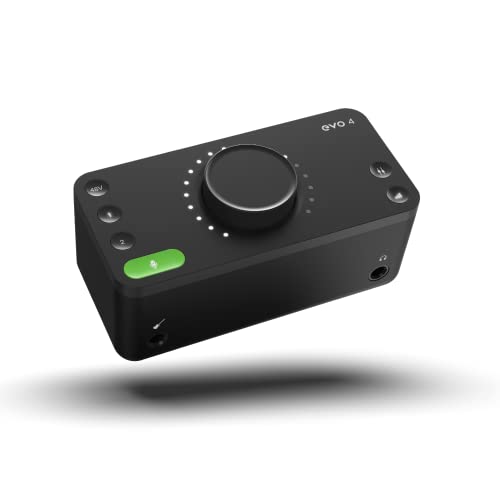 EVO Audient EVO 4Details ↓ EVO Audient EVO 4Details ↓ | $158.00 | 4.4/5Amazon | Best two-mic beginner session |
04 MOTU M4Details ↓ MOTU M4Details ↓ | $279.95 | 4.6/5Amazon | Best growing MIDI workspace |
05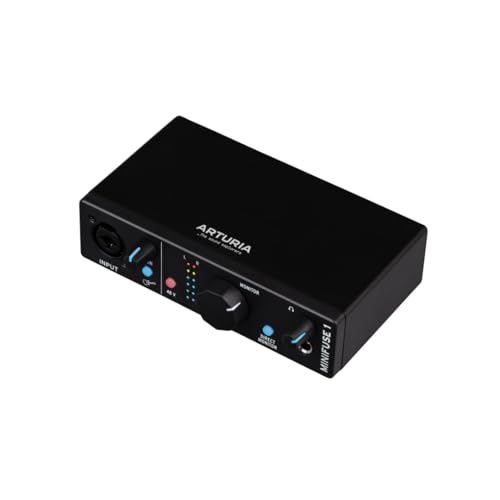 Arturia MiniFuse 1Details ↓ Arturia MiniFuse 1Details ↓ | $119.00 | 4.7/5Amazon | Best tiny one-input desk |
01 — Focusrite
Best first voice-and-guitar interfaceFocusrite Scarlett Solo 4th Gen
Scarlett Solo combines one XLR microphone preamp with a separate high-impedance instrument input, a sensible pair for a singer who records guitar and voice at a small Mac desk. Its direct monitoring helps you hear the input without relying on a software round trip. One microphone preamp is the hard limit: a two-person vocal session needs a different box.
I put it first because most new GarageBand projects do not need MIDI or four outputs; they need a clear mic-and-guitar path they can set up quickly. EVO 4 below is better for two simultaneous microphones, and MOTU M4 is a bigger studio investment. Pay for those only when the recording plan actually needs their extra channels.
Specifications: Focusrite Scarlett Solo 4th Gen ↗
View on Amazon ↗One singer or guitarist starting GarageBand.
You need two independent XLR microphones.
What I like
+One mic preamp plus instrument input.
What to weigh
−Only one microphone channel.
02 — Universal Audio
Best one-source vintage optionUniversal Audio Volt 1
Volt 1 is a compact single-input interface aimed at a voice or instrument, with Universal Audio's vintage preamp mode as a tone option. That is attractive if you like committing a little character while recording a GarageBand part. It does not give two simultaneous mic inputs, and the mode is a preference rather than evidence that every recording will sound better.
Second place is for a solo musician who wants that specific recording control. Scarlett Solo has a more obvious separate mic-and-instrument layout for a first setup, while EVO 4 below supports two mic preamps. I would choose Volt 1 when one source at a time is enough and its character switch is worth the extra attention.
Specifications: Universal Audio Volt 1 ↗
View on Amazon ↗Solo vocal or instrument tracks.
Two singers must record together.
What I like
+Compact one-source path with vintage mode.
What to weigh
−Single primary input limits duets.
- Mic inputs
- 1
- Resolution
- 24-bit / 192 kHz
03 — EVO
Best two-mic beginner sessionAudient EVO 4
EVO 4 puts two microphone preamps in a compact desktop unit and uses a simplified control system with Smartgain to set input levels. That helps when two people record into separate GarageBand tracks or a singer and acoustic instrument both need microphones. Its shared control approach is less immediately tactile than the separate knobs some beginners expect.
Third is where the guide moves beyond one-person recording. I would choose EVO 4 over Scarlett Solo when the second XLR mic is a real part of the session. MOTU M4 below adds more output and MIDI options, but buying those for a two-mic demo would spend money without changing the number of singers you can record.
Specifications: Audient EVO 4 overview ↗
View on Amazon ↗Two microphones on a compact Mac desk.
You prefer dedicated knobs for every input.
What I like
+Two mic preamps and Smartgain.
What to weigh
−Shared controls take getting used to.
- Mic inputs
- 2
- Features
- Smartgain / loopback
04 — MOTU
Best growing MIDI workspaceMOTU M4
MOTU M4 expands the home desk with four-in/four-out routing, front-panel meters and MIDI I/O for a hardware keyboard. It still has two microphone preamps; the extra line channels are for other sources, not four singers on XLR mics. The current offer is substantially above the simple one-input options, so I would use its routing before paying for it.
Fourth is an upgrade path, not a better first GarageBand purchase. If you are building a keyboard-and-outboard setup, the meters and MIDI make a practical difference over EVO 4. If you only record a guitar and occasional vocal, Scarlett Solo ranks ahead because it covers the job with much less hardware and cost.
Specifications: MOTU M4 product details ↗
View on Amazon ↗A home setup with keyboard MIDI and monitors.
You only need a single mic and guitar.
What I like
+MIDI I/O, four-channel routing and meters.
What to weigh
−High cost for a basic song demo.
05 — Arturia
Best tiny one-input deskArturia MiniFuse 1
MiniFuse 1 gives a single mic-or-instrument recording path in a small USB interface, useful when a travel MacBook and one source are the whole studio. It saves desk space and money beside MOTU M4. Its one primary input makes simultaneous independent mic and guitar recording less flexible than Scarlett Solo's separate paths; check that distinction against how you build tracks.
Fifth is a useful specialist for overdubbing one part at a time, not a blanket recommendation for every musician. I would choose it when portability and a simple desk matter more than simultaneous inputs. For voice and guitar together, Scarlett Solo deserves its higher position; for two mics, EVO 4 does.
Specifications: Arturia MiniFuse 1 product details ↗
View on Amazon ↗One-at-a-time recording on a small desk.
You record mic and instrument simultaneously.
What I like
+Small one-input footprint.
What to weigh
−Limited simultaneous input paths.
- Mic inputs
- 1
- Loopback
- Yes
Price information
Amazon price and availability checked Oct 17, 2026, 10:23 PM Lisbon time. Prices and availability are subject to change; the information shown on Amazon.com at purchase applies.
Our process
How we picked.
We compare five relevant products for different needs, using documented specifications, clear use cases and practical trade-offs. Our goal is to make the differences clear and help you choose with confidence.
- 01Relevance
Each product must fit the guide’s intended use, audience and requirements.
- 02Specifications
We compare the key product details that meaningfully affect the buying decision.
- 03Use case and fit
We compare the intended use, configuration and practical fit of every selected product.
- 04Strengths and limitations
We explain where each option performs best and the compromises to consider.
Good questions
FAQ — GarageBand Audio Interfaces by Recording Plan
01Do I need an audio interface to record in GarageBand?+
A Mac can use its built-in microphone, but an interface provides proper connections for an XLR mic, guitar and headphones. Choose the input count from what you will record simultaneously.
02Can GarageBand record two microphones at once?+
Yes, with an interface that has two microphone preamps and the tracks configured for separate inputs. A one-mic interface such as Scarlett Solo or Volt 1 cannot provide two independent XLR mic channels.
The short answer
Start with the Focusrite Scarlett Solo 4th Gen.
I recommend it for one singer or guitarist starting garageband. Choose something else if you need two independent xlr microphones.
View on Amazon ↗Keep looking
Related guidesThe 5 Best Audio Interfaces for Guitar by Recording Setup
Five Focusrite, Audient, Arturia and Universal Audio interfaces for guitar, vocals, monitoring and layered home recording.
The 5 Best Audio Interfaces for Vocals
Five Volt, Focusrite, MAONO, MOTU and Shure interfaces compared by microphone inputs, monitoring and mobile use.

The 5 Best Podcast Audio Interfaces by Number of Hosts
Five Audient, M-Audio, Zoom and Focusrite interfaces for solo streams, two hosts, four mics and larger studios.
The 5 Best Audio Interfaces for Streaming by Host Count
Five Focusrite, Zoom, Audient and Behringer interfaces for solo streams, hardware loopback and multi-mic rooms.