The 5 Best Computers for Music Production by DAW and Session
A music computer can have a fast processor and still be the wrong studio purchase. Your DAW determines the operating system; sample libraries eat storage; and the audio interface needs a dependable connection. Start with those three checks before treating a benchmark score as a buying decision.
For a Logic Pro setup, I'd start with the Mac mini M6 and budget for an external sample drive: this exact version has only 256 GB inside. On Windows, the GEEKOM A7 gives larger sessions 32 GB of memory out of the box. Neither choice includes the interface, monitors or quiet-room performance measurements, so those belong in the full studio budget.
Our top 5 computers for music production by daw and session
Swipe to compare price, rating and best use →
| Product | Price | Rating | Best for |
|---|---|---|---|
01 Apple Mac mini M6Details ↓ Apple Mac mini M6Details ↓ | $779.99 | 4.3/5Amazon | Best for Logic Pro |
02 GEEKOM A7 32GBDetails ↓ GEEKOM A7 32GBDetails ↓ | $699.00 | 4.3/5Amazon | Best for large Windows sessions |
03 GEEKOM GT13 MAXDetails ↓ GEEKOM GT13 MAXDetails ↓ | $849.00 | 4.4/5Amazon | Best built-in project storage |
04 GMKtec M7 UltraDetails ↓ GMKtec M7 UltraDetails ↓ | $559.99 | 4.4/5Amazon | Best for external studio gear |
05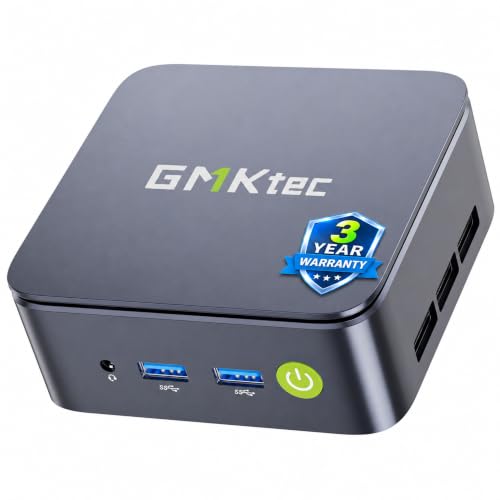 GMKtec NucBox G10Details ↓ GMKtec NucBox G10Details ↓ | $319.99 | 4.3/5Amazon | Best low-cost starter |
01 — Apple
Best for Logic ProApple Mac mini M6
If Logic Pro is the reason you're buying, this is the straightforward macOS desktop in the five. The exact M6 offer includes 16 GB of unified memory and a 256 GB SSD. That internal drive is the catch: a large instrument library deserves a planned external SSD, not a surprise purchase after setup.
I put the Mac mini first for the Logic buyer because OS compatibility settles the choice before processor comparisons begin. A Windows producer should skip it and look at the A7's 32 GB memory or the GT13's larger built-in SSD; neither can run macOS software.
Specifications: Apple Mac mini specifications ↗
View on Amazon ↗A Logic Pro desk.
Your DAW or plugins require Windows.
What I like
+Current macOS desktop with M6.
What to weigh
−Small 256 GB internal SSD.
02 — GEEKOM
Best for large Windows sessionsGEEKOM A7 32GB
The selected A7 has a Ryzen 7 7730U, 32 GB of RAM and a 500 GB SSD. Memory is its clear advantage for a Windows project with many tracks, instruments and browser tabs open together. It still relies on integrated graphics and offers less included storage than the GT13 or M2 Pro.
I rank A7 second because doubling the included memory is a more concrete studio benefit than a newer chip name for many session-heavy buyers. It falls behind the Mac mini only when Logic is essential; choose GT13 instead if the larger 1 TB drive matters more than RAM.
Specifications: Exact Amazon product listing ↗
View on Amazon ↗Windows sessions with many instruments.
You need macOS or a 1 TB built-in drive.
What I like
+32 GB included RAM.
What to weigh
−Only 500 GB included storage.
- Processor
- AMD Ryzen 7 7730U
- Memory
- 32GB RAM
- Storage
- 500GB SSD
- Connectivity
- USB-C, HDMI, 2.5Gb Ethernet
- Operating system
- Windows
03 — GEEKOM
Best built-in project storageGEEKOM GT13 MAX
The GT13 MAX combines a Core Ultra 9 185H, 16 GB of DDR5 memory and a 1 TB SSD. A terabyte inside the machine is useful when the current project and a sizeable library need to live together. USB4 leaves room for external drives and an interface, subject to the exact device requirements.
Third place is for the producer who values the 1 TB configuration more than A7's extra memory. Its higher current price and 16 GB starting RAM hold it below the A7 for broad Windows use; processor branding alone cannot prove a quieter or faster audio workflow.
Specifications: Exact Amazon product listing ↗
View on Amazon ↗A larger internal project drive.
32 GB memory matters more today.
What I like
+1 TB SSD and USB4.
What to weigh
−16 GB RAM at a higher price.
- Processor
- Intel Core Ultra 9 185H
- Memory
- 16GB DDR5
- Storage
- 1TB SSD
- Connectivity
- USB4, HDMI and Mini DisplayPort
- Operating system
- Windows
04 — GMKtec
Best for external studio gearGMKtec M7 Ultra
GMKtec's M7 Ultra lists a Ryzen 7 PRO 6850U, 16 GB of DDR5 RAM, a 512 GB SSD and two USB4 ports. That connection mix is the reason to consider it when a studio uses external storage and other high-bandwidth devices. Confirm the interface's own driver and port requirements first.
I keep it fourth because the port layout is valuable to a specific setup, while the A7 supplies more RAM and the GT13 more internal storage. I would move M7 up for a buyer who has mapped those two USB4 ports to real devices, not for an abstract promise of better sound.
Specifications: Exact Amazon product listing ↗
View on Amazon ↗Several external studio devices.
You need more RAM or internal storage included.
What I like
+Two USB4 ports.
What to weigh
−16 GB and 512 GB in this offer.
- Processor
- AMD Ryzen 7 PRO 6850U
- Memory
- 16GB DDR5
- Storage
- 512GB SSD
- Connectivity
- USB4, HDMI, OCuLink, dual 2.5Gb Ethernet
- Operating system
- Windows
05 — GMKtec
Best low-cost starterGMKtec NucBox G10
The G10 pairs an older Ryzen 5 3500U with 16 GB of memory and a 512 GB SSD at a lower current offer than the other Windows picks. It is a sensible starting box for recording, editing and lighter arrangements, provided you check the DAW's current processor and OS requirements.
Fifth is deliberate: price makes an entry studio possible, but a larger virtual-instrument session has more reason to pay for the A7's memory or the GT13's newer platform. Choose G10 when the workload is modest and the saved money is better spent on the interface.
Specifications: Exact Amazon product listing ↗
View on Amazon ↗A first, modest Windows studio.
You run heavy sample libraries.
What I like
+Lower current entry price.
What to weigh
−Older Ryzen platform and Wi-Fi 5.
- Amazon category sales rank observed
- 1636
Price information
Amazon price and availability checked Oct 17, 2026, 9:55 PM Lisbon time. Prices and availability are subject to change; the information shown on Amazon.com at purchase applies.
Our process
How we picked.
We compare five relevant products for different needs, using documented specifications, clear use cases and practical trade-offs. Our goal is to make the differences clear and help you choose with confidence.
- 01Relevance
Each product must fit the guide’s intended use, audience and requirements.
- 02Specifications
We compare the key product details that meaningfully affect the buying decision.
- 03Use case and fit
We compare the intended use, configuration and practical fit of every selected product.
- 04Strengths and limitations
We explain where each option performs best and the compromises to consider.
Good questions
FAQ — Computers for Music Production by DAW and Session
01Do I need macOS for Logic Pro?+
Yes. Check the current Logic Pro system requirements before buying; the Windows mini PCs here are for Windows-compatible DAWs.
02Is 256 GB enough for a music library?+
It can hold the OS and a modest working set, but large sample libraries may need external storage. Check the required space for your instruments and keep working space free.
The short answer
Start with the Apple Mac mini M6.
I recommend it for a logic pro desk. Choose something else if your daw or plugins require windows.
View on Amazon ↗Keep looking
Related guides
5 Best Desktop Computers for Video Editing
Five desktop computers for video editing, including iBUYPOWER Slate MESH Gaming PC and Skytech Gaming PC Desktop, compared for processor, graphics card and memory.
The 5 Best Programming Desktop PCs
Five GEEKOM, GMKtec and KAMRUI mini desktops for editors, containers, fast external storage and compact desks.
The 5 Best Mini PCs
Five Windows mini PCs, compared by processor, memory, storage and ports for everyday desktop work.