The 5 Best PC Gaming Headsets for Different Setups
Your PC headset has two jobs: let you hear the game and let your teammates understand you. A glowing earcup does neither. I would check whether the computer has a combined 3.5 mm jack, separate mic and headphone sockets, or USB before buying; the wrong plug can turn an inexpensive headset into a cable-adapter project. Comfort after an hour matters more than a surround-sound slogan.
The wired BlackShark V2 X is my most straightforward desktop recommendation. Barracuda X earns the wireless slot when you also play elsewhere, while a very cheap Ozeino or BENGOO makes more sense as a spare. I have not treated brand, RGB or a stated driver size as proof that any one pair sounds better.
Our top 5 pc gaming headsets for different setups
Swipe to compare price, rating and best use →
| Product | Price | Rating | Best for |
|---|---|---|---|
01 Razer BlackShark V2 XDetails ↓ Razer BlackShark V2 XDetails ↓ | $34.99 | 4.4/5Amazon | Best overall wired PC pick |
02 Razer Barracuda XDetails ↓ Razer Barracuda XDetails ↓ | $69.00 | 4.2/5Amazon | Best wireless multi-device choice |
03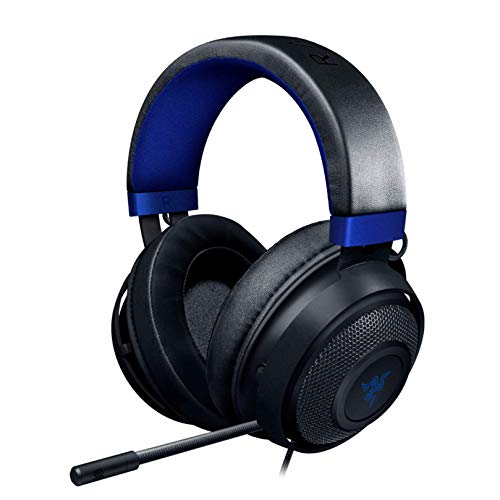 Razer KrakenDetails ↓ Razer KrakenDetails ↓ | $99.01 | 4.5/5Amazon | Best roomy wired alternative |
04 Ozeino OW810Details ↓ Ozeino OW810Details ↓ | $29.98 | 4.3/5Amazon | Best low-cost desk headset |
05 BENGOO G9000Details ↓ BENGOO G9000Details ↓ | $19.95 | 4.3/5Amazon | Best inexpensive spare |
01 — Razer
Best overall wired PC pickRazer BlackShark V2 X
BlackShark V2 X is where I would start for a PC gamer who wants a wired mic headset without managing a battery. Its lightweight, closed-ear format suits a desk setup, and the purchase decision is easy to frame: check the supplied 3.5 mm connection against the PC and test the seal and headband fit during the return window. A wire can still snag on a chair arm.
It leads because wired simplicity fits the broadest desktop use here at a modest current price. Barracuda X is worth the extra spend only when moving freely or switching devices matters.
Specifications: Exact Amazon product listing ↗
View on Amazon ↗Desktop players wanting wired simplicity.
You need to walk around untethered.
What I like
+No charging routine.
What to weigh
−Cable and ear fit remain personal.
02 — Razer
Best wireless multi-device choiceRazer Barracuda X
Barracuda X is the one to examine if the headset travels between a PC and another gaming device. Wireless use clears the desk of a dangling cable, but it introduces a charging routine and compatibility questions: verify the exact edition’s dongle, ports and supported consoles before purchase. I would not pay for that flexibility if the headset never leaves a single desktop.
Second fills a genuine wireless role. The BlackShark is cheaper and simpler for one stationary PC; Barracuda earns its price when the extra connection options get used.
Specifications: Exact Amazon product listing ↗
View on Amazon ↗Players moving between PC and other devices.
You dislike charging another accessory.
What I like
+Wireless freedom and broader use case.
What to weigh
−Higher cost and edition-specific compatibility.
03 — Razer
Best roomy wired alternativeRazer Kraken
Kraken is the alternative for someone who wants a substantial over-ear gaming headset and prefers a familiar wired design. Compare its weight, clamping pressure and mic position with the lighter BlackShark before deciding; long sessions expose comfort differences that a feature list hides. I would also check the exact model’s connector, since the Kraken name spans several versions.
Third adds an over-ear fit choice, not an assumed sound upgrade. BlackShark remains the safer broad pick for a simpler, lighter desktop setup at the current offer.
Specifications: Exact Amazon product listing ↗
View on Amazon ↗Players preferring a larger over-ear fit.
You need the lightest desk headset.
What I like
+Substantial wired design.
What to weigh
−Can feel bulkier; variant matters.
04 — Ozeino
Best low-cost desk headsetOzeino OW810
Ozeino OW810 makes sense when the headset is for occasional co-op sessions or a first gaming PC and the budget is tight. I would confirm that the microphone connector works with the computer and make a quick call recording during the return period; a low price cannot promise a clean mic in your room. Comfort and cable strain relief deserve a close look too.
Fourth is a price-led entry rather than a performance claim. I would spend more on BlackShark for a headset used every evening, but the Ozeino lowers the entry cost.
Specifications: Exact Amazon product listing ↗
View on Amazon ↗Occasional gaming on a tight budget.
You need a proven all-evening fit.
What I like
+Low current price.
What to weigh
−Mic and comfort need a real fit check.
05 — BENGOO
Best inexpensive spareBENGOO G9000
BENGOO G9000 is the fallback I would keep in mind for a shared computer or a spare in a drawer. Its value is having a complete headset ready when a main pair fails, not a promise of finer sound or better isolation. Check the exact plug, mic connection and any supplied adapter against the PC before buying it as an emergency replacement.
Fifth intentionally serves a spare role. Ozeino is another cheap primary option; BlackShark is the better everyday recommendation when calls and games both matter.
Specifications: Exact Amazon product listing ↗
View on Amazon ↗A backup for a shared or family PC.
You want one main long-session headset.
What I like
+Low-cost ready spare.
What to weigh
−Basic fit and connector verification needed.
Price information
Amazon price and availability checked Oct 17, 2026, 10:13 PM Lisbon time. Prices and availability are subject to change; the information shown on Amazon.com at purchase applies.
Our process
How we picked.
We compare five relevant products for different needs, using documented specifications, clear use cases and practical trade-offs. Our goal is to make the differences clear and help you choose with confidence.
- 01Relevance
Each product must fit the guide’s intended use, audience and requirements.
- 02Specifications
We compare the key product details that meaningfully affect the buying decision.
- 03Use case and fit
We compare the intended use, configuration and practical fit of every selected product.
- 04Strengths and limitations
We explain where each option performs best and the compromises to consider.
Good questions
FAQ — PC Gaming Headsets for Different Setups
01Do I need a splitter for a desktop PC?+
If the headset uses one four-pole 3.5 mm plug and the computer has separate headphone and microphone jacks, a compatible splitter may be required.
02Is wireless always better for PC games?+
No. A wired headset avoids charging and pairing; wireless is useful when you move between devices or sit away from the computer.
The short answer
Start with the Razer BlackShark V2 X.
I recommend it for desktop players wanting wired simplicity. Choose something else if you need to walk around untethered.
View on Amazon ↗Keep looking
Related guidesThe 5 Best Wireless Gaming Headsets
Five wireless gaming headsets, including Ozeino Wireless Gaming Headset and Logitech G733 Lightspeed, compared by platform compatibility, microphone, wireless link, comfort.
The 5 Best Gaming Headsets on a Budget
Five lower-cost gaming headsets compared by connection, microphone, comfort and platform fit.
The 5 Best Gaming Headsets with Microphones
Five gaming headsets for and microphone, chosen for responsive performance, low-latency control and more immersive play.
5 Best Xbox Gaming Headsets
Five Xbox Gaming Headsets, including BENGOO and Razer, compared for Xbox connection, microphone clarity and comfort.

The 5 Best Gaming Headsets with Mics for Different Setups
Five HyperX, Razer, NUBWO and Ozeino headsets for wired team chat, device switching and lower-cost wireless play.