The 5 Best Mini PCs for a Home Office
The tidy appeal of a mini PC is obvious until you run out of ports or storage. For email and documents, I would pay for enough memory, two usable display outputs and the network connection you actually have. A headline processor name matters less if the chosen box arrives with a tiny SSD or fixed RAM you cannot expand.
ACEMAGIC's K1 is my practical starting point at 16 GB of RAM, but its 256 GB drive is a real compromise. GMKtec's M2 Pro buys more storage, while the G10 serves a three-monitor desk for less. GEEKOM's A7 is for heavier multitasking; the GT13 MAX asks for a much larger budget.
Our top 5 mini pcs for a home office
Swipe to compare price, rating and best use →
| Product | Price | Rating | Best for |
|---|---|---|---|
01 ACEMAGIC K1 Ryzen 7330UDetails ↓ ACEMAGIC K1 Ryzen 7330UDetails ↓ | $338.99 | 4.3/5Amazon | Best cloud-first office |
02 GMKtec M2 ProDetails ↓ GMKtec M2 ProDetails ↓ | $499.98 | 4.3/5Amazon | Best built-in storage |
03 GEEKOM A7 Ryzen 7Details ↓ GEEKOM A7 Ryzen 7Details ↓ | $699.00 | 4.3/5Amazon | Best memory headroom |
04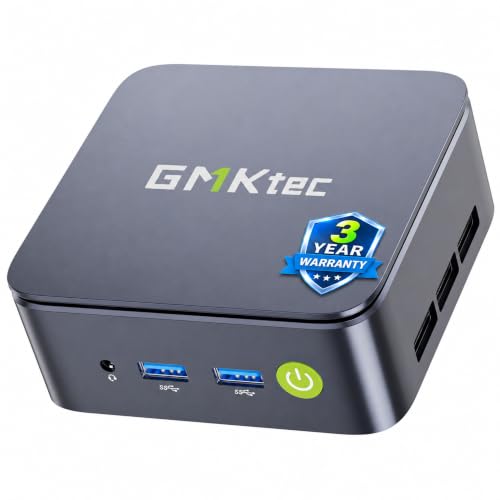 GMKtec NucBox G10Details ↓ GMKtec NucBox G10Details ↓ | $319.99 | 4.3/5Amazon | Best three-monitor desk |
05 GEEKOM GT13 MAX Ultra 9Details ↓ GEEKOM GT13 MAX Ultra 9Details ↓ | $849.00 | 4.4/5Amazon | Best demanding small desktop |
01 — ACEMAGIC
Best cloud-first officeACEMAGIC K1 Ryzen 7330U
The K1 offer pairs a Ryzen 3 PRO 7330U with 16 GB RAM and a 256 GB SSD. That is a more balanced memory starting point than an eight-gigabyte bargain box for browser tabs, calls and documents. Its small SSD is the price of admission; plan external or cloud storage if files accumulate.
I rank it first for an ordinary home office because the memory and current price line up with everyday work. GMKtec M2 Pro moves ahead if you keep large files locally; the pricier GEEKOMs are difficult to justify for email and spreadsheets alone.
Specifications: Exact Amazon product listing ↗
View on Amazon ↗Browser, calls and cloud documents.
You keep a large local library.
What I like
+16 GB memory at a lower price.
What to weigh
−256 GB SSD fills quickly.
- Processor
- AMD Ryzen 7330U
- Memory
- 16GB DDR4
- Storage
- 256GB SSD
- Connectivity
- USB-A, USB-C, HDMI and DisplayPort
- Operating system
- Windows
02 — GMKtec
Best built-in storageGMKtec M2 Pro
The selected M2 Pro lists an Intel Core i7-1185G7, 16 GB memory and a one-terabyte SSD. That much built-in storage is useful when the office keeps photos, client files or offline projects on the machine. The 11th-generation processor name should not be confused with a current desktop workstation.
Second because a full terabyte fixes the K1's most obvious limit without going to GEEKOM's higher prices. I would take the K1 for a cloud-first desk and this GMKtec for a local-file workflow, after checking the exact ports against the monitors.
Specifications: Exact Amazon product listing ↗
View on Amazon ↗Large local files on one small PC.
Your work is mostly cloud documents.
What I like
+One-terabyte SSD in the chosen offer.
What to weigh
−Older processor generation.
- Processor
- Intel Core i7-1185G7
- Memory
- 16GB DDR4
- Storage
- 1TB SSD
- Connectivity
- Dual HDMI, USB-C, 2.5Gb Ethernet
- Operating system
- Windows
03 — GEEKOM
Best memory headroomGEEKOM A7 Ryzen 7
GEEKOM's selected A7 pairs a Ryzen 7 7730U with 32 GB RAM and a 500 GB SSD. The memory is the reason to look here if several browser profiles, large spreadsheets and light creative apps run together. It is still an integrated-graphics mini PC, not a substitute for a dedicated graphics workstation.
Third is for a busier desk that can use 32 GB today. I keep the less costly K1 and roomier-storage M2 above it for the common office brief; paying for A7 makes sense when memory pressure is a real part of your day.
Specifications: Exact Amazon product listing ↗
View on Amazon ↗Heavy office multitasking.
You only use email and web apps.
What I like
+32 GB RAM in the exact configuration.
What to weigh
−Costs more without a dedicated GPU.
- Processor
- AMD Ryzen 7 7730U
- Memory
- 32GB RAM
- Storage
- 500GB SSD
- Connectivity
- USB-C, HDMI, 2.5Gb Ethernet
- Operating system
- Windows
04 — GMKtec
Best three-monitor deskGMKtec NucBox G10
The G10 offer combines an older Ryzen 5 3500U with 16 GB memory and a 512 GB SSD. HDMI, DisplayPort and USB-C display outputs make three-screen planning easier than on a box with one or two video ports. Its Wi-Fi 5 and older processor are the compromises to notice before ordering.
Fourth is for the buyer whose office layout needs three separate displays more than a newer CPU. I keep the K1 ahead for the ordinary one- or two-monitor desk, and the A7 above it when 32 GB memory matters more than the extra output.
Specifications: GMKtec NucBox G10 specifications ↗
View on Amazon ↗Three wired office displays.
You need newer Wi-Fi or heavy processing.
What I like
+HDMI, DisplayPort and USB-C display paths.
What to weigh
−Older Ryzen generation and Wi-Fi 5.
- Amazon category sales rank observed
- 1636
05 — GEEKOM
Best demanding small desktopGEEKOM GT13 MAX Ultra 9
The GT13 MAX offer pairs Intel Core Ultra 9 185H with 16 GB DDR5 and a one-terabyte SSD. It offers stronger processor headroom for a compact desk, but do not assume its 16 GB RAM suits every heavy workload just because the CPU name is grand. Check upgradeability and cooling expectations.
Fifth overall because most home offices can buy the K1 or M2 and spend the difference on a better monitor. It moves up for a buyer with genuinely demanding local software who accepts the high price and confirms the memory ceiling.
Specifications: Exact Amazon product listing ↗
View on Amazon ↗Demanding local apps in little space.
Your work is web and documents.
What I like
+Core Ultra 9 and 1 TB SSD.
What to weigh
−High price with only 16 GB RAM.
- Processor
- Intel Core Ultra 9 185H
- Memory
- 16GB DDR5
- Storage
- 1TB SSD
- Connectivity
- USB4, HDMI and Mini DisplayPort
- Operating system
- Windows
Price information
Amazon price and availability checked Oct 17, 2026, 9:55 PM Lisbon time. Prices and availability are subject to change; the information shown on Amazon.com at purchase applies.
Our process
How we picked.
We compare five relevant products for different needs, using documented specifications, clear use cases and practical trade-offs. Our goal is to make the differences clear and help you choose with confidence.
- 01Relevance
Each product must fit the guide’s intended use, audience and requirements.
- 02Specifications
We compare the key product details that meaningfully affect the buying decision.
- 03Use case and fit
We compare the intended use, configuration and practical fit of every selected product.
- 04Strengths and limitations
We explain where each option performs best and the compromises to consider.
Good questions
FAQ — Mini PCs for a Home Office
01Can a mini PC drive two office monitors?+
Many can, but count the exact HDMI, DisplayPort or USB-C display outputs and their supported resolution on the selected model.
02How much storage should I buy?+
A 256 GB drive can work for cloud-first documents; large local media, backups or multiple user accounts make a bigger SSD more useful.
The short answer
Start with the ACEMAGIC K1 Ryzen 7330U.
I recommend it for browser, calls and cloud documents. Choose something else if you keep a large local library.
View on Amazon ↗Keep looking
Related guidesThe 5 Best Mini PCs
Five Windows mini PCs, compared by processor, memory, storage and ports for everyday desktop work.
The 5 Best Programming Desktop PCs
Five GEEKOM, GMKtec and KAMRUI mini desktops for editors, containers, fast external storage and compact desks.
The 5 Best Ergonomic Office Chairs
Five ergonomic office chairs, including Primy Tall Drafting Chair and TRALT Ergonomic Mesh Chair, compared by seat dimensions, lumbar adjustment, arm position, weight capacity.