The 5 Best Cable Modems for Cox
Cox modem shopping starts with your address and internet plan, not a “fastest modem” badge. Cox publishes a certified-device list and different plans can have different requirements. I would check the exact model against that list before buying, then match its Ethernet port to the router I already own. A modem-only box does not give you Wi-Fi, and a DOCSIS number cannot overcome an unsupported plan.
For an approved multi-gig setup, ARRIS S33 is my balanced pick; Netgear CM2500 is the pricier modem-only alternative. SB8200 covers a conventional DOCSIS 3.1 gigabit setup, Hitron CODA56 offers another 2.5 Gb path, and Motorola MB7621 is only for a slower, explicitly supported plan. I have kept the older Motorola in fifth place so its lower price does not obscure the upgrade limits.
Our top 5 cable modems for cox
Swipe to compare price, rating and best use →
| Product | Price | Rating | Best for |
|---|---|---|---|
01 ARRIS SURFboard S33Details ↓ ARRIS SURFboard S33Details ↓ | $194.99 | 4.3/5Amazon | Best balanced multi-gig modem |
02 Netgear Nighthawk CM2500Details ↓ Netgear Nighthawk CM2500Details ↓ | $197.00 | 4.3/5Amazon | Best Netgear modem-only choice |
03 ARRIS SURFboard SB8200Details ↓ ARRIS SURFboard SB8200Details ↓ | $169.00 | 4.4/5Amazon | Best conventional gigabit modem |
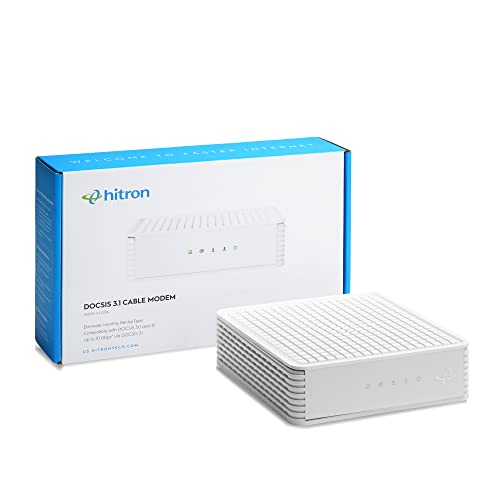
04 Hitron CODA56Details ↓ Hitron CODA56Details ↓ | $189.99 | 4.1/5Amazon | Best Hitron alternative |
05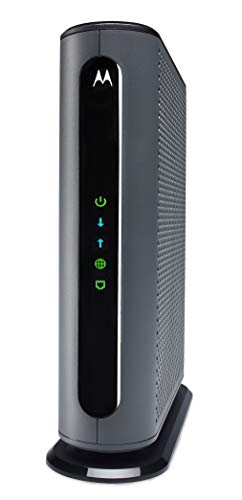 Motorola MB7621Details ↓ Motorola MB7621Details ↓ | $79.30 | 4.5/5Amazon | Best slower-tier budget modem |
01 — ARRIS
Best balanced multi-gig modemARRIS SURFboard S33
The S33 is a DOCSIS 3.1 modem with one 2.5 Gb and one 1 Gb Ethernet port. That makes it a useful starting point for a Cox household with a suitable plan and separate router. I would check the model on Cox's certified list and understand how those ports work with the service; two sockets do not automatically mean two public connections.
It leads for a buyer who wants room to upgrade without paying for a router inside the modem. Netgear is the alternative for a CM2500 preference; the cheaper SB8200 is enough when the wired handoff will stay at gigabit speed.
View on Amazon ↗Cox customers planning a faster wired home network.
Your plan or router cannot use multi-gig Ethernet.
What I like
+DOCSIS 3.1 with a 2.5 Gb port.
What to weigh
−Port benefits depend on service and router.
- Type
- DOCSIS 3.1 cable modem
- Ethernet
- 1 × 2.5 GbE + 1 × 1 GbE
- WiFi
- None
- Voice
- None
- Provider
- Confirm exact tier before purchase
02 — NETGEAR
Best Netgear modem-only choiceNetgear Nighthawk CM2500
The CM2500 targets multi-gig cable service while leaving Wi-Fi to a separate router. It appeals to a household already invested in Netgear networking or one that wants a simple modem-router boundary. Verify this exact model against the Cox tier before ordering; its high offer is wasted if the service or home router stops at lower speed.
Second place reflects a higher cost than S33 for overlapping buyers. I would choose it ahead of ARRIS only when its exact compatibility, ports or ecosystem fit the network you are actually building.
View on Amazon ↗Netgear households with a qualifying Cox plan.
You want the lowest-priced modem for a basic tier.
What I like
+Modern DOCSIS 3.1 modem-only design.
What to weigh
−Higher offer and separate Wi-Fi router needed.
- Type
- DOCSIS 3.1 cable modem
- Ethernet
- 2 × 1 GbE
- MultiGig
- WAN link aggregation with compatible router
- WiFi
- None
- Voice
- None
03 — ARRIS
Best conventional gigabit modemARRIS SURFboard SB8200
SB8200 is the familiar DOCSIS 3.1 alternative for a household whose wired network is staying at gigabit or below. Its two 1 Gb ports need a careful read: do not assume automatic 2 Gb service from the listing. I would compare its price with S33 before buying, because a small saving may not justify a lower port ceiling for a planned upgrade.
Third place is a sensible cost-and-speed compromise. It rises to first for a stable slower tier when Cox certifies it and the current offer is materially below the multi-gig models.
View on Amazon ↗Homes staying on a gigabit-or-lower Cox tier.
You expect a 2.5 Gb wired handoff soon.
What I like
+DOCSIS 3.1 without a multi-gig premium.
What to weigh
−1 Gb Ethernet port ceiling.
- Type
- DOCSIS 3.1 cable modem
- Ethernet
- 2 × 1 GbE
- WiFi
- None
- Voice
- None
- StockAtCheck
- One new unit displayed
04 — Hitron
Best Hitron alternativeHitron CODA56
Hitron's CODA56 supplies DOCSIS 3.1 and a single 2.5 Gb Ethernet handoff with no Wi-Fi or voice service. It is a useful alternative if Cox certifies the exact version for your address and its current offer beats the other multi-gig options. I would check the model label carefully: other CODA listings look similar but need not be the same modem.
Fourth place reflects the need to verify Cox approval and the overlap with S33. I would move it up when its exact certified model and one-port setup meet the plan at a better live price.
View on Amazon ↗Cox buyers wanting a simple 2.5 Gb modem-only box.
You need integrated Wi-Fi or voice service.
What I like
+2.5 Gb port in a separate modem.
What to weigh
−Exact model and plan approval are essential.
- ProductType
- modem
05 — Motorola
Best slower-tier budget modemMotorola MB7621
The MB7621 is a lower-priced DOCSIS 3.0 cable modem with a 1 Gb Ethernet port. It can be appropriate for a qualifying slower Cox plan, but I would not buy it for a new high-speed tier without checking Cox's current certified list and upgrade policy. A cheap modem becomes expensive if it must be replaced when the plan changes.
Fifth place is deliberate: the cost is attractive, yet its older DOCSIS generation limits the upgrade story. It becomes the sensible pick only when Cox confirms the exact model for a modest plan and the savings matter.
View on Amazon ↗Cox customers on an approved lower-speed plan.
You are planning a fast tier or multi-gig upgrade.
What I like
+Low current offer.
What to weigh
−DOCSIS 3.0 limits future headroom.
- ProductType
- modem
Price information
Amazon price and availability checked Oct 17, 2026, 11:12 PM Lisbon time. Prices and availability are subject to change; the information shown on Amazon.com at purchase applies.
Our process
How we picked.
We compare five relevant products for different needs, using documented specifications, clear use cases and practical trade-offs. Our goal is to make the differences clear and help you choose with confidence.
- 01Relevance
Each product must fit the guide’s intended use, audience and requirements.
- 02Specifications
We compare the key product details that meaningfully affect the buying decision.
- 03Use case and fit
We compare the intended use, configuration and practical fit of every selected product.
- 04Strengths and limitations
We explain where each option performs best and the compromises to consider.
Good questions
FAQ — Cable Modems for Cox
01How do I know whether a modem works on my Cox plan?+
Use Cox’s current certified modem list for your address and tier, and match the exact model number. An Amazon compatibility line is not the final authority.
02Do I need a separate router with these modems?+
Yes. These are modem-only options; add a compatible router or existing home network equipment for Wi-Fi.
The short answer
Start with the ARRIS SURFboard S33.
I recommend it for cox customers planning a faster wired home network. Choose something else if your plan or router cannot use multi-gig ethernet.
View on Amazon ↗Keep looking
Related guidesThe 5 Best Cable Modems for Spectrum
Five Hitron, Netgear and ARRIS modems for approved Spectrum plans, gigabit service and multi-gig networks.

The 5 Best Laptops under $500
Five laptops under $500, chosen for useful everyday features, credible performance and a more sensible price.
The 5 Best Cable Modems
Five Hitron, ARRIS and NETGEAR cable modems for approved plans, faster wired networks and one-box Wi-Fi.