The 5 Best Drawing Tablets for Computers
A drawing tablet with a screen and one without a screen are different purchases. A pen display lets you draw where you look but needs desk space, a compatible computer and cables. A screenless pad is cheaper and more portable, but you learn to watch the monitor while your hand moves elsewhere. Start with the software and computer ports, then choose a working area that fits your arm movement.
I would choose the XPPen Artist 13.3 Pro V2 for a desk where drawing directly on the screen matters enough to justify the cables and price. For a beginner working from a tight budget, the larger screenless Huion pad is a more sensible starting point. Check the actual computer connections before falling in love with a pen display photograph.
Our top 5 drawing tablets for computers
Swipe to compare price, rating and best use →
| Product | Price | Rating | Best for |
|---|---|---|---|
01 XP-Pen XPPen Artist 13.3 Pro V2Details ↓ XP-Pen XPPen Artist 13.3 Pro V2Details ↓ | $269.99 | 4.4/5Amazon | Best compact pen-display desk setup |
02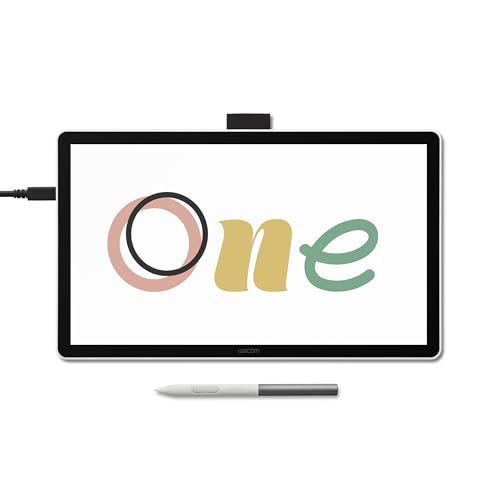 Wacom One 14Details ↓ Wacom One 14Details ↓ | $249.95 | 4.0/5Amazon | Best roomier beginner pen display |
03 Huion Inspiroy H1060PDetails ↓ Huion Inspiroy H1060PDetails ↓ | $43.99 | 4.4/5Amazon | Best generous screenless workspace |
04 XP-Pen XPPen Deco 01 V3Details ↓ XP-Pen XPPen Deco 01 V3Details ↓ | $59.99 | 4.5/5Amazon | Best value screenless alternative |
05 Wacom Intuos SmallDetails ↓ Wacom Intuos SmallDetails ↓ | $39.95 | 4.6/5Amazon | Best compact first drawing pad |
01 — XP-Pen
Best compact pen-display desk setupXPPen Artist 13.3 Pro V2
The Artist 13.3 Pro V2 puts the drawing surface under the pen, with a dial and shortcut keys that can keep common actions near the hand. Its 13.3-inch canvas suits a desk that cannot hold a much larger display. I would check the exact cable and port arrangement against the computer, then budget for an ergonomic position; this is not a standalone tablet. The extra hardware costs far more than a screenless pad.
It leads for a buyer who specifically wants to draw on a screen without dedicating a huge desk. Wacom One 14 provides more display room, while Huion is the stronger value when looking at a monitor while drawing is acceptable.
View on Amazon ↗Artists wanting direct pen-on-display drawing at a desk.
You need a standalone device or the lowest price.
What I like
+Screen drawing with dial and shortcut controls.
What to weigh
−Computer connection and desk space required.
02 — Wacom
Best roomier beginner pen displayWacom One 14
Wacom One 14 gives a beginner more visual room than the compact XPPen display and a simpler pen-display proposition than a pile of high-end controls. That extra surface can help with palettes and larger strokes, but it also asks for more desk width and the right computer connection. I would confirm the exact pen, cable and operating-system compatibility from the model documentation, not a generic Wacom accessory page.
Second place is a screen-size alternative with a higher space cost. It can outrank the XPPen if you want a larger canvas and a simpler control layout; the smaller display is easier to place on an existing desk.
View on Amazon ↗Beginners wanting a larger on-screen canvas.
Your desk is narrow or you travel with the tablet.
What I like
+Roomy direct-drawing surface.
What to weigh
−Needs a connected computer and more desk area.
03 — HUION
Best generous screenless workspaceHuion Inspiroy H1060P
Huion H1060P offers a broad active drawing area and many shortcut keys for someone willing to learn screenless hand-eye coordination. At its checked price, it is a more approachable route to long brush strokes than either pen display. The trade is immediate: your eyes stay on the monitor, and driver setup and button mapping take time. I would verify support for the computer's current operating system before ordering.
Third place recognizes how much working area it buys for the money. It can be first for a budget digital illustrator with desk room; the display picks lead only when drawing directly beneath the pen is worth the extra cost.
View on Amazon ↗Artists wanting a large pad for less money.
You must see the line appear under your pen tip.
What I like
+Large active area and many shortcuts.
What to weigh
−Screenless learning curve and driver setup.
04 — XP-Pen
Best value screenless alternativeXPPen Deco 01 V3
The Deco 01 V3 is another large-format screenless pad at a modest checked offer, with shortcut keys and a battery-free pen in the listing. That makes it useful for a learner who wants room to move without paying for a display. I would compare its active area, cable position and current driver support with the Huion before choosing. A quoted pressure-level figure cannot tell you which surface feels better.
Fourth place gives a sensible price and layout alternative to Huion. It may be the better fit for a specific workspace or preferred shortcut arrangement; the Huion stays ahead for its established large-workspace role in this selection.
View on Amazon ↗Beginners wanting a roomy low-cost screenless pad.
You prefer direct drawing on a display.
What I like
+Large surface at a modest offer.
What to weigh
−Requires monitor coordination and driver checks.
05 — Wacom
Best compact first drawing padWacom Intuos Small
Intuos Small is the pad I would consider for a student with very little desk space or someone adding handwritten annotations rather than sweeping illustration strokes. The pen and compact body travel more easily than the larger boards. I would check the exact included software offer and connection type rather than assuming every Wacom bundle is identical. Its small active area can feel cramped if you draw from the shoulder.
Fifth place is a purposeful small-pad role. It could be first for a traveler or note-taker, but the larger Huion and XPPen pads offer more room for sustained art at similar budget levels.
View on Amazon ↗Students and travelers with little desk space.
You need a large canvas for broad arm movements.
What I like
+Compact, portable pen input.
What to weigh
−Small active area for detailed illustration.
Price information
Amazon price and availability checked Oct 17, 2026, 10:24 PM Lisbon time. Prices and availability are subject to change; the information shown on Amazon.com at purchase applies.
Our process
How we picked.
We compare five relevant products for different needs, using documented specifications, clear use cases and practical trade-offs. Our goal is to make the differences clear and help you choose with confidence.
- 01Relevance
Each product must fit the guide’s intended use, audience and requirements.
- 02Specifications
We compare the key product details that meaningfully affect the buying decision.
- 03Use case and fit
We compare the intended use, configuration and practical fit of every selected product.
- 04Strengths and limitations
We explain where each option performs best and the compromises to consider.
Good questions
FAQ — Drawing Tablets for Computers
01Do these drawing tablets work without a computer?+
The pen displays and screenless drawing tablets in this list are computer peripherals, not standalone iPad-style tablets. Confirm the operating system, ports, cables and driver support for the exact model before buying.
02Should a beginner choose a pen display or screenless tablet?+
A display feels more direct but costs more and takes desk space. A screenless pad is affordable and portable, though hand-eye coordination takes practice. Choose by budget, workspace and comfort rather than pressure-level marketing.
The short answer
Start with the XPPen Artist 13.3 Pro V2.
I recommend it for artists wanting direct pen-on-display drawing at a desk. Choose something else if you need a standalone device or the lowest price.
View on Amazon ↗Keep looking
Related guides
The 5 Best Tablet for Kids
Five Amazon Fire and Android kids tablets compared by parental controls, app access, case support and update confidence.

The 5 Best Computer Tablets
Five tablet computers, led by Amazon Fire HD 10 tablet and Amazon Fire HD 8 tablet, selected for display, software and battery life.
The 5 Best Android Tablets
Five android tablets, including Samsung Galaxy Tab A11 2026 and Android 16 Tablet 10 Inch, compared by software support, display and storage.

The 5 Best Tablets for Lactose Intolerance
Five tablets for lactose intolerance, chosen for simple controls, portable entertainment and useful everyday flexibility.