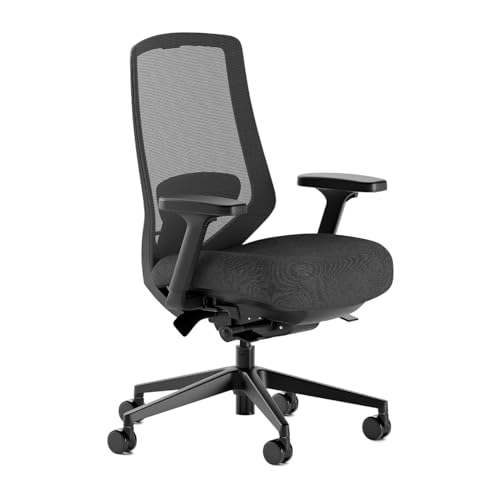
If you are shopping for an office chair because your back, shoulders or legs start complaining halfway through the day, ignore the “ergonomic” sticker for a moment. A chair only works when its adjustment range fits your body and lets you get close to your desk. Seat height and depth come first; lumbar support, armrests and recline follow. Our best ergonomic office chairs guide shows how that translates into real choices.
01
Measure the user and the desk
Sit with your feet flat and notice what happens under your thighs. The seat should support them without pressing behind the knees or leaving your legs dangling. Compare the chair's minimum and maximum height with the shoes you normally wear. A footrest can solve a high-desk problem, but it should not be used to rescue a chair that is plainly too tall.
Seat depth is the measurement people most often skip. You want most of the thigh supported with a small gap behind the knee; a sliding seat pan makes that easier, especially when people share the chair. Check usable width and the space between the arms too. Taller readers can narrow the field with our guide to office chairs for tall people.
02
Focus on adjustments that help
Good lumbar support should meet your lower back, not shove you away from the backrest. Height adjustment helps, but more knobs do not automatically mean more comfort. A gently flexible back can feel better over a long day than a hard pad that is technically adjustable. Our chairs for lumbar support guide explains what to look for.
Armrests are useful only if they let your shoulders relax and the chair still approach the desk. Check whether they go low enough, narrow enough or far enough back. “4D” sounds impressive, but it is not a benefit when the pads slide every time you stand up.
03
Recline and movement matter
There is no perfect posture to hold for eight hours. A balanced recline lets you move between typing, reading and calls without losing support. Look for tension that suits your weight and a few angles you can actually use; a seat that moves with the back often feels more natural than one that stays flat while the back disappears behind you.
A headrest is optional for upright work and more useful when you recline. It should meet the head without pushing it forward. A standing desk set to the right height adds another position, although standing perfectly still all day is not the answer either.
04
Test the whole desk setup
Specifications cannot reveal a pressure point or scratchy fabric. Sit in the chair for longer than a showroom minute if you can. When buying online, read the return fee, assembly conditions and trial policy before the box arrives; returning a fully built chair can be the least ergonomic part of the purchase. If you are deciding between two styles, our office chair vs gaming chair comparison explains which features matter for work.
Set the chair up at your real desk. Keep the keyboard close and let your shoulders relax. Then place the screen using our monitor size and resolution guide. Change one setting at a time. Start with seat height, then move to the back and armrests.
The best test is pleasantly ordinary: can you type, lean back and stand up without fighting the chair? It can support better habits, but it is not a medical treatment. Persistent pain deserves professional advice rather than another accessory.
Sources and further reading
We use primary and specialist sources to check the principles in this article. Product recommendations are researched separately.